What Actually Happens When You Read a File
14 Things That Happen Before You Get Your Bytes
Reading time: ~13 minutes
You wrote data = open('file.txt').read().
Two function calls. That's all you did. Python is happy. Your bytes are there. The whole thing took 0.317 milliseconds and you moved on with your life.
Under the hood, at least four separate processors woke up to serve you. One of them is inside your storage drive. Another is a dedicated interrupt controller. A third is the flash memory controller that lives alongside the NAND chips themselves, running its own firmware, maintaining its own data structures in its own RAM. And then there's your CPU, which you thought was doing all the work.
Let's go look at what actually happened.
The Comfortable Lie
The mental model most of us carry is: open a file, read the bytes, done. The file is "on disk." Reading it means "getting it from disk." Maybe there's a cache involved. Simple.
The truth is more interesting. Here's the actual stack:
Python f.read()
  └── C stdlib buffering
        └── read(2) syscall
              └── kernel VFS layer
                    └── filesystem driver (ext4, xfs, btrfs...)
                          └── block I/O scheduler
                                └── NVMe driver
                                      └── NVMe controller (separate ARM/RISC-V SoC)
                                            └── Flash Translation Layer
                                                  └── NAND flash cells
                                                        └── DMA → system RAM
You've probably hit the effects without knowing the cause: the first read of a file takes longer than subsequent reads. Large files on SSDs can stall with weird latency spikes. Programs that read the same file concurrently don't always step on each other. None of this makes sense until you know what's underneath.
You Haven't Even Left Python Yet
f = open('file.txt')   # this IS a syscall — the kernel is already working
data = f.read()        # and now it works harder
open() in Python isn't just creating a file object. CPython calls down to the open(2) syscall immediately — the kernel resolves the path, walks the directory tree, loads the inode, checks permissions, and allocates a file descriptor. By the time open() returns, the kernel has done real work. What it hasn't done is read any data. The file is open. The bytes are still on disk.
f.read() is where the data moves. Python's file object calls through its buffered I/O layer, which calls read(2) — the actual POSIX syscall that triggers the chain of events this post is about.
Now we're at the syscall boundary.
The Syscall — Crossing Into Kernel Space
The read(2) syscall is the moment your program stops being in charge.
Your code executes a special CPU instruction — syscall on x86-64 — that switches the processor from user mode to kernel mode. The CPU saves your current register state, changes privilege level, and jumps to the kernel's syscall handler. Your process is now blocked, waiting. The kernel is driving.
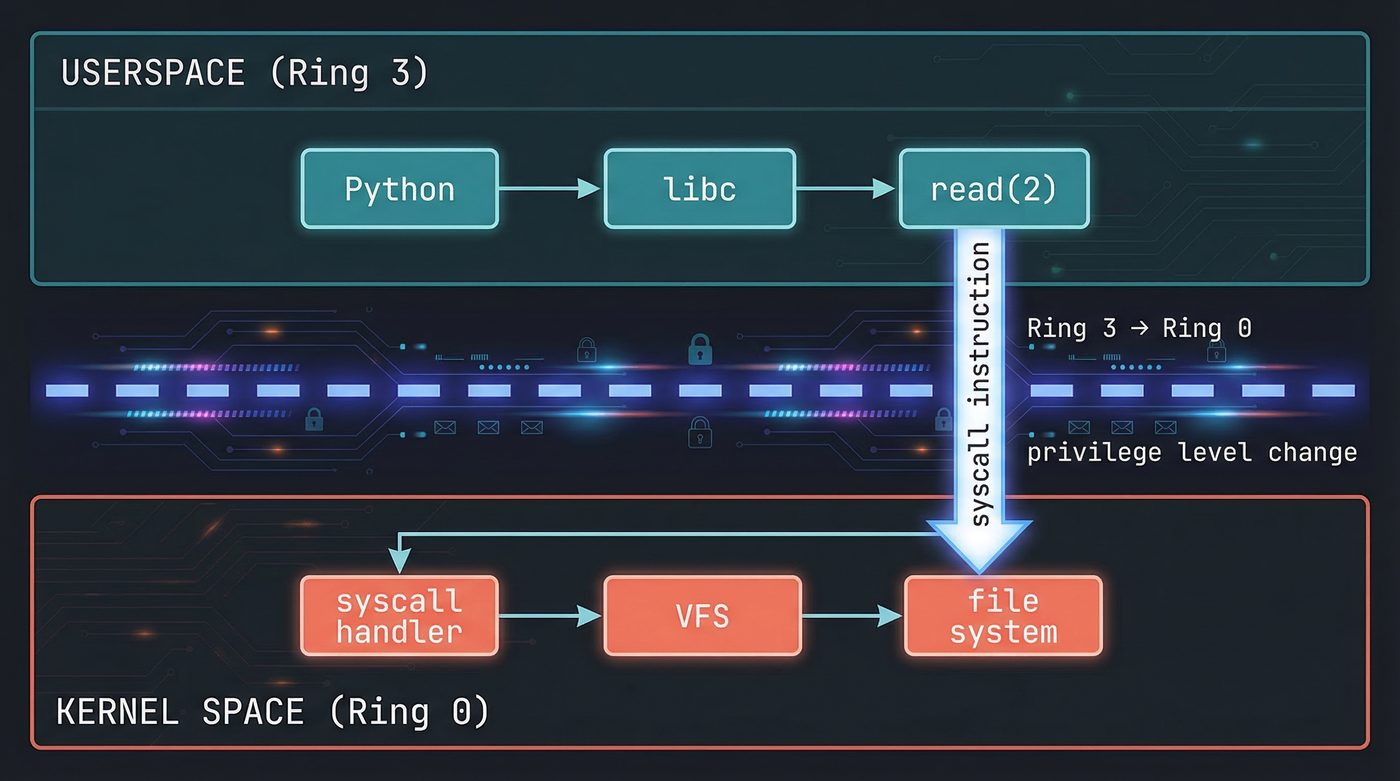
The kernel looks up the file descriptor you passed. File descriptors are integers — small ones, starting at 0. Behind that integer is a struct file in kernel memory, containing things like the current read position, flags, and most importantly: a pointer to the VFS inode for this file.
The VFS — The Kernel Doesn't Know What a Filesystem Is
I mean it does but in the name of abstraction the kernel doesn't operate in terms of ext4 or XFS at this level.
The kernel has a Virtual Filesystem (VFS) layer — an abstraction that sits above all actual filesystem implementations and defines a common interface. Every filesystem registers itself by providing a set of function pointers: here's how to look up a file by name, here's how to read an inode, here's how to iterate a directory.
When read(2) lands in the kernel, it calls through the VFS. The VFS looks at the inode for your file and calls that filesystem's read function. If you're on ext4, the ext4 driver handles it. If you're on btrfs, btrfs handles it. Your process has no idea which one it is.
This is why you can mount a USB drive formatted with FAT32 and open() files on it with exactly the same Python code. Same syscall. Same VFS interface. Different driver underneath.
read(fd)
  → kernel VFS layer
    → ext4_file_read_iter()   # or xfs_file_read_iter(), etc.
      → generic_file_read_iter()
        → page cache lookup
The Page Cache — The Kernel's Memory is Not Your Memory
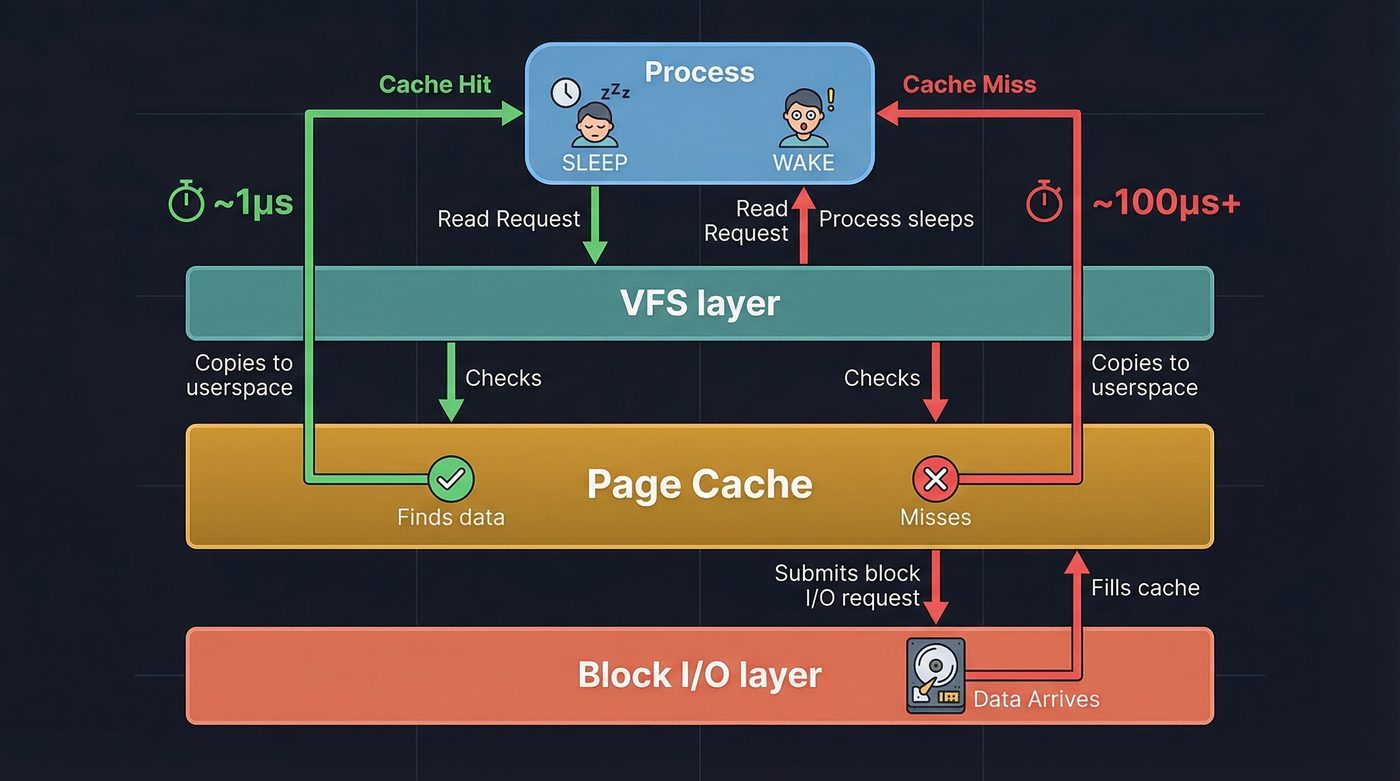
Before any I/O happens, the kernel checks the page cache.
The page cache is a giant in-memory buffer the kernel maintains for file data. Every file read that came from disk is stored here. Every file write passes through here before hitting disk (in writeback mode). The page cache is the reason the second read() of the same file is instant: the bytes are already sitting in kernel memory.
Pages are 4KB chunks. The kernel asks: does the page cache contain the pages that cover the byte range this read() asked for?
If yes: copy the bytes from kernel memory into the userspace buffer your process provided. Done. No I/O. The whole chain from syscall to return took maybe 1–2 microseconds.
If no: we need to go get them. This is where it gets interesting.
That's why warm caches are fast and cold caches are slow. A page cache hit skips everything below — the filesystem, the block layer, the NVMe controller, NAND sensing, DMA, all of it. Irrelevant when your bytes are already in kernel memory. This is why spinning up a long-running server process is slow at first — nothing is cached — and then blazing fast once the working set is warm.
That's why mmap() exists. Mapping a file into virtual memory cuts out the copy step. The page cache pages are mapped directly into your process's virtual address space. When you access them, the CPU's MMU handles the translation. No read() syscall, no copy into a userspace buffer — the page cache IS your buffer. For large files read once, this is often faster. For small files read repeatedly, the syscall overhead doesn't matter and read() is fine. As an aside when I first discovered CreateFileMapping() (Windoze equiv of mmap) back in the late 90s, I was amazed, I started using it for everything till one of my mentors pled with me to stop ... but I did not 😂.
That's why databases use O_DIRECT. PostgreSQL and other databases bypass the page cache entirely with O_DIRECT, writing directly to the block layer. They maintain their own buffer pools and don't want the kernel caching their data twice. The kernel's cache is designed for general workloads; a database has better information about which pages to keep warm.
The Filesystem's Job — Names Don't Mean Anything
The filesystem translates the filename into block addresses.
Inside the filesystem, files are identified by inodes. The inode is a data structure that stores everything about a file except its name: permissions, timestamps, owner, size, and most importantly — where the data actually lives on disk.
The filename is just a pointer to an inode. The inode contains block addresses. The block addresses are where the data is.
For ext4, the inode uses a tree of "extent" records. An extent says "this file's data from byte offset X to offset Y is stored at block address Z on disk." Large files have multiple extents. Highly fragmented files have many extents that the filesystem has to chase down.
For a small file that's been there since the filesystem was created, you might get one extent: "all your bytes are at block 12845." For a file that's been written in pieces over months, you might get dozens of extents spread across the disk.
The filesystem resolves all of this and hands the block layer a list of logical block addresses to fetch.
The Block Layer — The Scheduler You Never Knew You Had
Between the filesystem and the storage driver, there's a block I/O layer with a scheduler.
For traditional spinning hard drives, the scheduler tries to minimize seek time by reordering requests so the drive head doesn't thrash back and forth. For NVMe SSDs, the scheduler does something different: it batches requests and submits them in parallel. NVMe was designed for SSDs and supports up to 65535 queues with up to 65535 commands each. The bottleneck isn't seek time; it's queue depth and controller parallelism.
For NVMe on modern Linux, the default scheduler is often none — the kernel trusts the device's own queuing. Check your system with cat /sys/block/nvme0n1/queue/scheduler.
Your single read() call might generate one I/O request. A larger read, or a file with many extents, might generate several requests, all in flight simultaneously.
The NVMe Controller — A Separate Computer
Here's where most people's mental model breaks down completely.
Your NVMe drive is not a passive block device. It's a computer.
Inside your SSD, there's a dedicated NVMe controller: an ARM (or MIPS, or RISC-V) processor running its own firmware, with its own RAM (typically up to 2GB for caching and FTL mapping tables on consumer drives; cheap drives use HMB — Host Memory Buffer — borrowing from your system RAM instead), its own instruction cache, its own operating loop. It boots when your machine powers on. It's running right now, independent of your CPU.
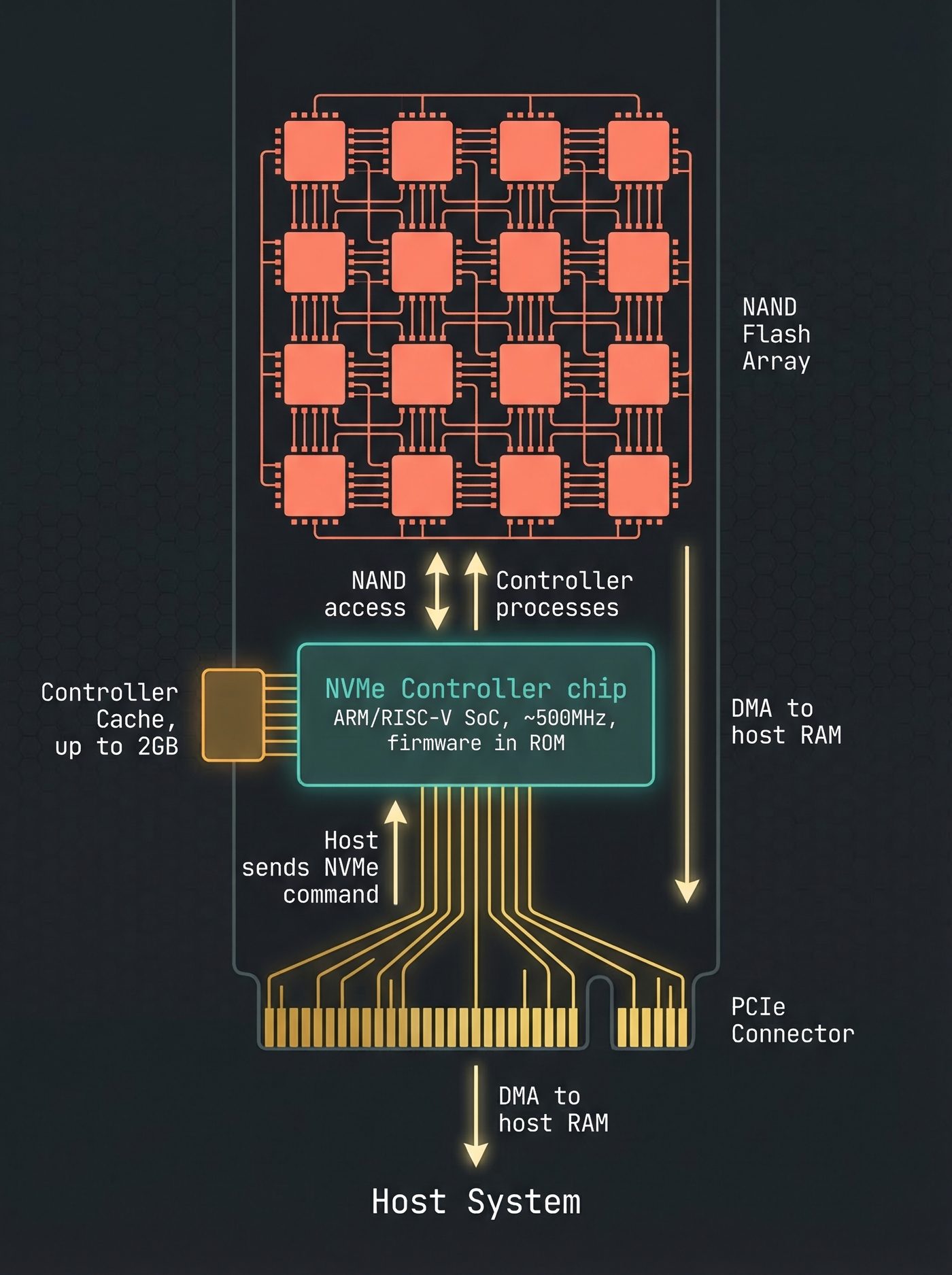
The NVMe protocol is how your CPU's storage driver talks to this controller. When Linux wants to read blocks 12845–12850, it writes a command into a submission queue in memory — a region that both the CPU and the NVMe controller can see, via PCIe. The controller polls or is notified of this command, picks it up, and starts processing it.
The CPU posts the command and goes to sleep, waiting for a completion notification. The NVMe controller is now in charge.
The Flash Translation Layer — Another Layer of Lies
The NVMe controller doesn't directly address NAND flash cells. There's one more indirection: the Flash Translation Layer (FTL).
NAND flash has two deeply inconvenient properties that make it unsuitable for direct use as a block device:
First, you can only write to a NAND cell by erasing it first. Erasing happens in "erase blocks" — units typically 128KB to several megabytes. You can't erase individual bytes. If you want to update 4KB of data in the middle of an erase block, you have to read the whole erase block, erase it, modify the relevant part, and write it all back.
Second, NAND cells wear out. Each erase cycle damages the cell's insulator a little. Consumer NAND is typically rated for 1,000–3,000 program-erase cycles. After that, the cell starts to lose charge and eventually holds incorrect data. If you wrote to the same physical location every time, it would wear out while the rest of the drive was fresh.
The FTL solves both problems. It maintains a mapping table — a giant lookup table in the controller's RAM — that maps the logical block address the host sees to the physical block address where data actually lives in the NAND. Every write goes to a fresh location, and the FTL updates the mapping. The old physical location is marked as invalid, to be reclaimed during garbage collection.
That's why TRIM matters. Without TRIM, the FTL doesn't know which logical blocks are no longer in use. It has to do garbage collection under load, pausing your writes while it erases blocks it thinks might be reclaimable. The OS tells the drive what it deleted. The drive's FTL updates its tables. Without TRIM, your SSD gets slower over time as it accumulates "dead" mappings it can't safely reclaim.
That's why SSDs slow down near full. The FTL runs out of fresh blocks and has to garbage-collect under load. Write amplification increases, and your writes start waiting on internal erase cycles. "90% full" means the FTL has 10% of its physical space to maneuver in.
For a read, the FTL translates: "you want logical block 12845" → "that's at physical NAND page 0xAF3C14." Now the controller can address the NAND directly.
NAND Sensing — Bits Are Charges
NAND flash stores bits as electrical charge on a floating gate — a conductor surrounded by insulating oxide, sandwiched inside a transistor.
Programmed (lower charge) reads as a 0. Erased (higher charge) reads as a 1. Sensing the charge means applying a reference voltage to the gate and measuring whether the cell conducts. The reference voltage is carefully calibrated — and for MLC or TLC NAND (2 or 3 bits per cell), there are multiple voltage thresholds to distinguish, because each cell holds multiple charge levels representing different bit patterns.
The NAND controller reads a full page at once — typically 4KB to 16KB. It applies the sense voltage across thousands of cells in parallel, latches the results into a page register, and then applies ECC (Error Correcting Code) to detect and correct any errors.
NAND cells are lossy. Fresh cells might have error rates of 1 bit per billion. Near end-of-life, that might be 1 bit per thousand. ECC is mandatory — without it, you'd get bit flips constantly.
After ECC, you have the corrected page data in the controller's page register. The relevant portion is your file's blocks.
DMA — The CPU Doesn't Touch the Data
When the NVMe controller transfers data from its page register to your system RAM, your CPU doesn't touch the data. You read that right, and it's not some expensive server build hardware optimisation, this works on that 2018 14 inch laptop you still carry around.
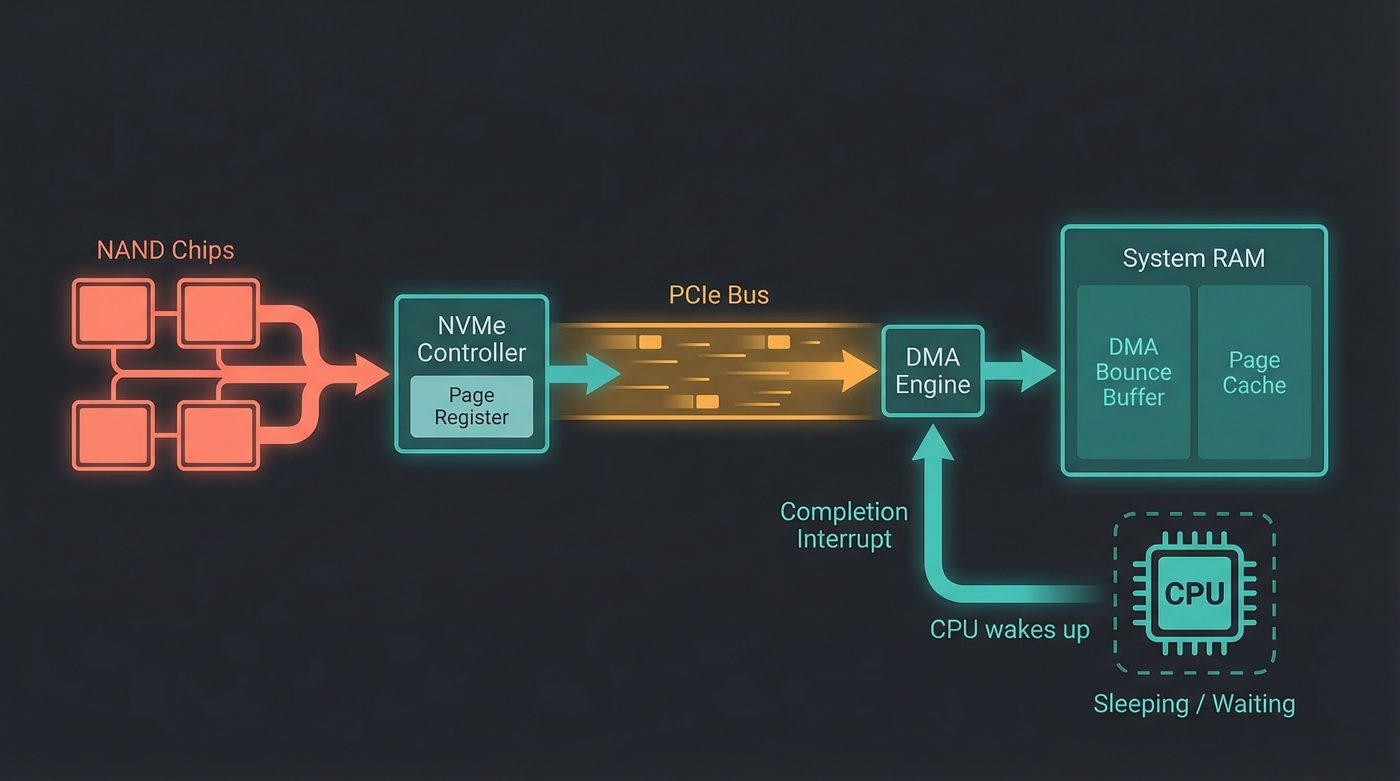
Direct Memory Access (DMA) lets the NVMe controller (and other peripherals) write directly to system RAM over the PCIe bus, without interrupting the CPU. The DMA engine is a separate piece of hardware — often on the CPU die, but logically separate — that handles these memory transfers while the CPU does other things (or sleeps, in this case, since your process is blocked).
The NVMe controller was told the physical address of the DMA target buffer when Linux submitted the I/O command. Now it uses the PCIe bus's memory write transactions to transfer the data directly into that buffer. No CPU instruction reads any of those bytes.
The data travels: NAND → controller page register → PCIe bus → DMA engine → system RAM.
Your CPU set up the transfer and will be notified when it's done. That's it.
The Interrupt — MSI-X
When the DMA transfer completes, the NVMe controller needs to tell the CPU.
It does this with an MSI-X interrupt — a "Message Signaled Interrupt eXtended." Instead of a physical signal on an interrupt pin (the old way), the controller writes a small message to a specific memory address. The interrupt controller (usually the APIC on x86 systems — another separate piece of hardware) sees this write and delivers the interrupt to the appropriate CPU core.
The CPU's interrupt handler wakes up, runs the NVMe completion handler, marks the I/O as complete, and unblocks the page fault that was waiting for this data.
MSI-X is worth naming because it enables one of the key performance features of NVMe: multiple independent queues mapped to different CPU cores. Old storage interrupts all went to one CPU, which then had to fan out work. With MSI-X, each NVMe queue can interrupt a different core. The NVMe controller talks directly to all the CPUs in parallel.
Back in the Kernel — Assembly
The page cache is now populated with the data from disk. The kernel copies the bytes from the page cache into the userspace buffer your process provided in the read() syscall. The syscall returns.
Your process unblocks. The return value is the number of bytes read. Control returns to Python's f.read() implementation, then to your code.
data has your bytes.
The Processor Count
Let's count the processors involved in that single read() call:
- Your CPU — executed the syscall, set up DMA, blocked, received the interrupt, ran the completion handler, copied bytes to userspace
- The NVMe controller — ARM/RISC-V SoC inside the drive, executed the FTL lookup, sent NAND commands, supervised the DMA transfer
- The NAND flash controller — embedded within or tightly coupled to the NAND chips, handled the page read, applied ECC, transferred data to the controller's page register
- The interrupt controller (APIC) — delivered the MSI-X completion interrupt to the correct CPU core
Four processors, minimum. More if you count the DMA engine as a separate compute element, which it arguably is.
For one read() call. That took 0.3 milliseconds.
The Lesson
We started with two lines of Python. Here's what they were hiding: the VFS, a filesystem driver, a block scheduler, an NVMe command queue, a Flash Translation Layer, NAND physics, DMA hardware, and interrupt routing.
None of those layers are particularly complicated on their own. It's the stack of them, the fact that each one is a complete independent system with its own logic and failure modes, that makes "reading a file" more interesting than it looks.
The next time you hit an unexpected latency spike on a read, or notice that a fresh server is slower than a warmed-up one, or wonder why SSDs slow down when they're 90% full — you know where to look.
Further Reading
man 2 read— The read syscall. Start here, then follow the rabbit hole.- Linux Kernel Documentation: The Page Cache — Authoritative, dense, worth it.
- Flash Memory Guide, AnandTech — Excellent deep dive into NAND internals, written for engineers.
nvme list/nvme smart-log /dev/nvme0— Poke at your own NVMe controller. The SMART data it returns is illuminating.- NVM Express Base Specification — The actual protocol spec. Freely available. Section 3 covers the submission/completion queue model.
I'm writing a book about what makes developers irreplaceable in the age of AI. Join the early access list →
Naz Quadri occasionally stares at perf trace output and wonders how many processors it takes to screw in a lightbulb. He blogs at nazquadri.dev. Rabbit holes all the way down 🐇🕳️.