Why ls -l Is Slow: Inodes, Directory Entries, and the Filesystem Layer
A Million Files Walk Into a Directory
Reading time: ~14 minutes
You ran ls -l on a directory with a million files. It hung. You waited. You Ctrl-C'd. You tried ls -1 and it was fast. You tried ls -U and it was instant.
Same directory. Same files. Same command. Three slight variations. Three wildly different speeds.
The difference between these three commands comes down to one thing: whether the kernel has to read the inode (an i-what? stop making up words Naz!) for every file in the directory. And to understand why that matters, you need to know what a directory is, what an inode is, and why the distance between them on disk is the bottleneck.
A Directory Is a File
This is the fact that rewires your mental model.
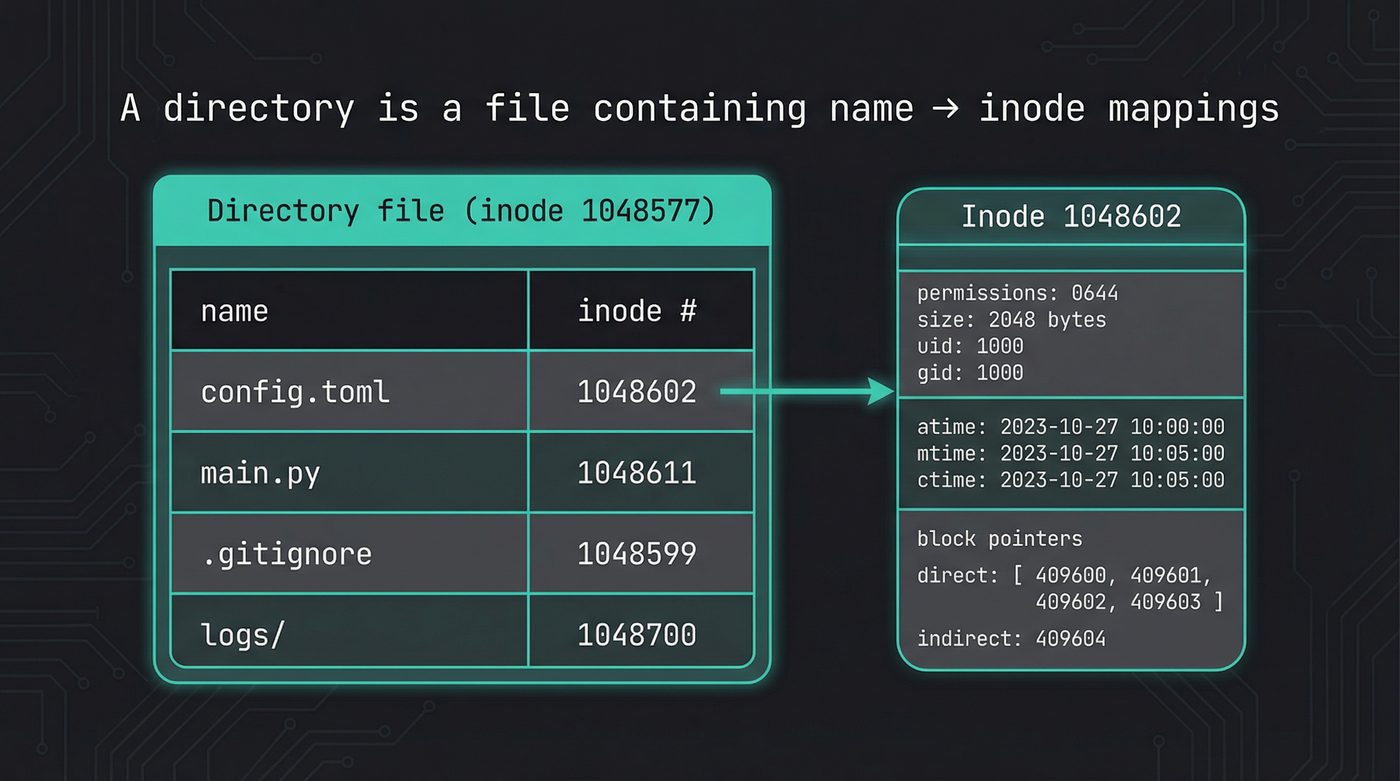
A directory is not a container. It's not a folder. It's a file. A regular file on disk, with its own inode, its own block allocations, its own size in bytes. The only difference between a directory and a regular file is a flag in its inode that says "my contents are directory entries, not arbitrary data."
The contents of that file are a list of mappings. Each entry maps a name to an inode number. That's it. A phone book. Name on the left, number on the right.
When you call readdir(), you're reading this file sequentially. The kernel walks through the directory entries one at a time, handing you back names and inode numbers. It's reading a file. The same way cat reads a file.
At the lowest level, this is the C struct the kernel gives you:
// From <dirent.h> — what readdir() returns
struct dirent {
    ino_t  d_ino;       // inode number
    off_t  d_off;       // offset to next entry
    unsigned short d_reclen;  // length of this record
    unsigned char  d_type;    // file type (DT_REG, DT_DIR, etc.)
    char   d_name[256]; // null-terminated filename
};
Notice what's in that struct: a name and an inode number. Not a file size. Not permissions. Not timestamps. Those live somewhere else entirely.
Every language wraps this differently, but they're all calling readdir() under the hood:
import os

# os.scandir() wraps readdir() — gives you DirEntry objects
for entry in os.scandir("/var/log"):
    print(f"{entry.inode():>10}  {entry.name}")
    # On Linux, entry.is_file() uses d_type — no stat() needed
use std::fs;

// std::fs::read_dir() wraps readdir()
for entry in fs::read_dir("/var/log")? {
    let entry = entry?;
    let ino = entry.ino(); // Unix-specific: std::os::unix::fs::DirEntryExt
    println!("{:>10}  {}", ino, entry.file_name().to_string_lossy());
}
What an Inode Is
The inode is everything about a file except its name.
Permissions. Owner. Group. Size. Timestamps (modified, accessed, and inode-changed — plus birth time on Linux/ext4, which is an extension, not part of POSIX). Link count. And the block pointers that tell the kernel where the file's actual data lives on disk.
The inode number is the file's real identity. The filename you type in your terminal is a label — a human convenience stored in a directory entry. The kernel doesn't care about filenames. It cares about inode numbers.
This means renaming a file — mv old.txt new.txt — doesn't touch the inode at all. The data doesn't move. The permissions don't change. The timestamps don't change. The kernel just updates the directory entry to point the new name at the same inode number. That's why mv within the same directory is instant regardless of file size — you could rename a 50GB file in microseconds because you're editing a directory entry, not moving data.
$ ls -i myfile.txt
1048602 myfile.txt
$ mv myfile.txt renamed.txt
$ ls -i renamed.txt
1048602 renamed.txt   # same inode — nothing moved
Cross-directory mv on the same filesystem is the same trick — create a new directory entry in the target directory, remove the old one. Still instant. But mv across filesystems? That's a copy + delete, because inode numbers are per-filesystem. The inode can't follow the file to a different partition. That's why moving a large file to a USB drive is slow — it's not renaming, it's copying the whole dang thing.
# Raw inode data for a file
$ stat config.toml
  File: config.toml
  Size: 2048        Blocks: 8          IO Block: 4096   regular file
Device: 259,2       Inode: 1048602     Links: 1
Access: (0644/-rw-r--r--)  Uid: ( 1000/    naz)   Gid: ( 1000/    naz)
Access: 2026-03-27 14:32:01.000000000 -0400
Modify: 2026-03-25 09:15:44.000000000 -0400
Change: 2026-03-25 09:15:44.000000000 -0400
 Birth: 2026-03-20 11:00:03.000000000 -0400
import os

s = os.stat("config.toml")
print(f"inode:  {s.st_ino}")
print(f"size:   {s.st_size}")
print(f"links:  {s.st_nlink}")
print(f"uid:    {s.st_uid}")
print(f"blocks: {s.st_blocks}")
The stat() system call fetches this inode data. And that's where the performance story starts.
Why -l Is Slow
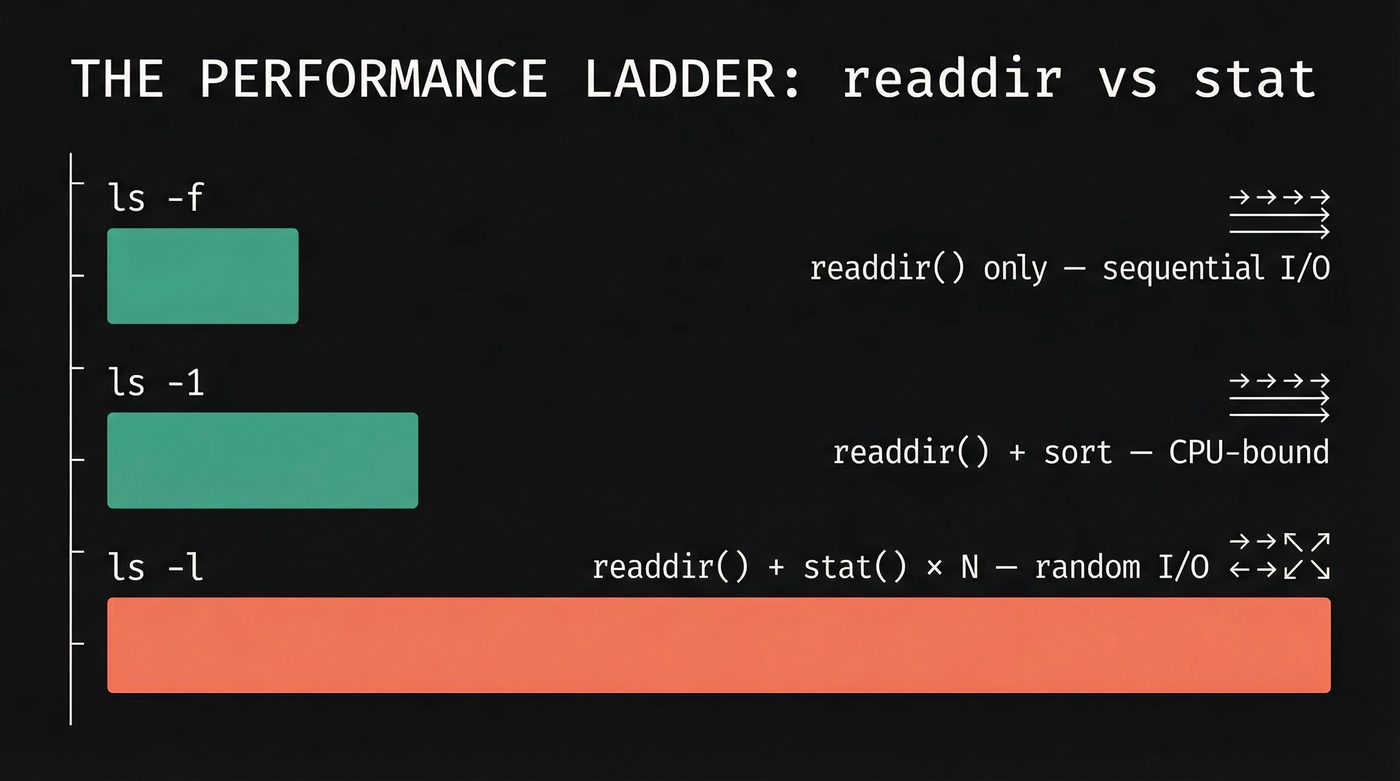
ls -U (or ls -f on GNU coreutils) calls readdir(). It reads the directory file sequentially, prints each name, and stops. No sorting, no metadata. It's reading one file on disk. Fast.
ls -1 calls readdir() and sorts the names alphabetically. Sorting a million strings takes real CPU time, but it's all in memory. Still fast. Maybe a second or two.
ls -l calls readdir(), then calls stat() on every single entry to fetch permissions, ownership, size, timestamps, and link count. That's the -l in "long format" — it needs the inode data for every file.
Here's why that's brutal: the directory entries are stored together in the directory file, which is contiguous or close to it on disk. Sequential read. The kernel loves sequential reads. But the inodes those entries point to? They could be anywhere.
Files created at different times get inodes from different inode groups. A file created in January and a file created in November might have inodes that are gigabytes apart on the physical disk. Every stat() call is potentially a random I/O operation — the disk head (or the SSD controller) has to go find that particular inode.
A million files means a million stat() calls. On a cold cache — meaning the inode data isn't already in RAM — that's potentially a million random reads scattered across the disk.
The page cache saves you on hot directories. If you ls -l the same directory twice, the second time is fast because all the inodes are cached in RAM. But the first time, on a cold cache, on a spinning disk? Go make coffee. Come back. Consider a career change. (Don't worry — we'll prove this with strace in the Practical Debugging section below.)
The Performance Ladder
The full ranking, from fastest to slowest, on a directory with a million files:
ls -U (or ls -f on GNU coreutils) — readdir() only, no sort, no stat. Dumps names in directory order (which looks random to you, but it's the physical order on disk). Instant. If you're on Ubuntu, your ls might be uutils coreutils (the Rust rewrite, of course that's what I run!), which only supports -U, not -f.
ls -1 — readdir() plus sort. Fast. Sorting a million short strings is a few hundred milliseconds.
ls (no flags) — same as ls -1 but adds multi-column formatting. Negligible difference.
ls -l — readdir() plus stat() on every entry, plus sort. Slow. The stat calls dominate.
ls -la — even worse. Now you're stat-ing dotfiles too, and in directories with a million entries there are often thousands of hidden files from build systems and version control.
find . -maxdepth 1 — uses getdents() directly with large buffers, batched. No stat unless you add -ls or a predicate that needs metadata. For enumeration-only tasks, find is the right tool.
ls -alrt — the old-timer's favourite. One of the first things I was taught as a junior engineer was to always use ls -alrt when checking log directories. The a shows hidden files, l gives the long format, r reverses the sort order, and t sorts by modification time. The result: the most recently modified file is at the bottom of the output — right above your cursor, right where you're looking. For a log directory, that's the file you care about: the one being written to right now.
It's a brilliant habit for small directories. On a log directory with 50 files, it's instant and it tells you exactly what's active. The problem is that it combines the two most expensive operations: stat() on every file (for the timestamps) and sort (by mtime instead of name). On the million-file directory? Same as ls -l, plus the sort is now by a field that requires inode data. Every bad habit in this list, bundled into four characters of muscle memory. I still type it reflexively. I just know to wince first on big directories.
Why Doesn't ls Just Parallelise the stat() Calls?
The million stat() calls are embarrassingly parallel. Each one is independent — file A's inode has nothing to do with file B's. So I built a tool to find out.
ls-alpha is a Rust reimplementation of ls with three stat strategies: classic (single-threaded), parallel (crossbeam scoped threads), and io_uring (batched statx submissions). Same readdir, same output, different stat engines.
The results on 100,000 files (NVMe, ext4):
                stat      total
classic         91ms      130ms
parallel        39ms       80ms    ← 2.4x faster stat, 1.6x faster total
io_uring        97ms      134ms    ← no faster (cache hits are already fast)
-f (no stat)    32ms       34ms    ← the floor
system ls -l     —        215ms    ← ls-alpha parallel beats it
Parallel wins. Crossbeam scoped threads, one batch per CPU core, 2.4x faster on the stat phase. The total (80ms) beats GNU ls -l (215ms).
io_uring doesn't help — and this is the interesting part. On NVMe with warm inode cache, each stat() is hitting RAM, returning in nanoseconds. The overhead of building io_uring submission queue entries and reaping completions cancels out any parallelism benefit. There's no device latency to overlap, so the ring is pure overhead. I explore this much deeper in post 35 (io_uring), where the same pattern shows up in file reads: on page cache, io_uring loses to a plain read() loop. But flip to O_DIRECT with real device I/O, and io_uring at queue depth 128 delivers 37× the IOPS of sync pread() from a single thread. The difference is whether there's actual latency to hide.
But the biggest surprise wasn't stat at all. Before I added a uid/gid name cache, ls-alpha -l took 715ms — 3x slower than GNU ls. The stat phase was 91ms. Where was the other 624ms? In getpwuid(). Every call to users::get_user_by_uid() does an NSS lookup — reading /etc/passwd or hitting LDAP or SSSD. Called 100,000 times, that's the real bottleneck. One HashMap<u32, String> cache brought the total from 715ms to 130ms. The obvious optimisation (parallel stat) gave 2x. The non-obvious one (cache uid→name) gave 5.5x.
The lesson: profile before you parallelise. The bottleneck is not always where you think it is.
ext4 Directory Indexing
Small directories on ext4 are stored as a simple linear list of entries. The kernel walks the list from top to bottom. For a directory with 20 files, this is fine.
But ext4 knows this doesn't scale. When a directory grows past a threshold (roughly 2-3 disk blocks worth of entries), ext4 switches from a linear list to an htree — a hashed B-tree. Each filename is hashed, and the hash determines which block contains that entry.
This gives you O(log n) lookup by name. When you stat("config.toml"), the kernel doesn't scan the entire directory — it hashes the name, walks the tree, and finds the entry in a few block reads. Huge win for operations like open() that need to find one specific file.
But readdir() still walks all entries. The htree helps lookup, not enumeration. When you need every entry in the directory — which is exactly what ls needs — the htree doesn't save you. The kernel still has to visit every leaf block in the tree.
This is a design tradeoff, not a bug. Directories with millions of files are rare. Lookup speed matters more than enumeration speed in nearly all real workloads. The htree is the right call.
Hardlinks: What Link Count Actually Means
Look at the stat output from earlier. There's a field called "Links." For most files, it says 1. What is it counting?
A hardlink is another directory entry pointing to the same inode. Not a copy. Not a reference. A second name in a (possibly different) directory that maps to the same inode number. The inode doesn't know or care how many names point to it — it just has a counter.
$ echo "hello" > original.txt
$ ln original.txt hardlink.txt
$ stat original.txt | grep Links
  Links: 2
$ stat hardlink.txt | grep Links
  Links: 2
$ ls -i original.txt hardlink.txt
1048602 hardlink.txt  1048602 original.txt
Same inode. Two names. Two directory entries in the same (or different) directory file, both containing the number 1048602.
rm doesn't delete the inode. It removes one directory entry and decrements the link count. The inode — and its data blocks — are only freed when the link count hits zero and no open file descriptors reference it.
That second condition is the tie back to post 03 (File Descriptors). A process can open() a file, another process can rm it, and the first process keeps reading and writing to it. The directory entry is gone, the link count is zero, but the file descriptor keeps the inode alive. The data is only truly deleted when the last file descriptor closes. This is the deleted-but-open trick that databases use for crash-safe temporary files, and it's why lsof +L1 shows you files that are consuming disk space but don't appear in any directory.
Symlinks vs Hardlinks
A symlink is a separate inode. It has its own inode number, its own metadata. The inode's data blocks contain a path string — that's it. When you access a symlink, the kernel reads the path, then does a second lookup to find the target.
A hardlink is not a separate inode. It's a directory entry pointing to an existing inode. No indirection.
Two constraints fall out of this:
You can't hardlink across filesystems. Inode numbers are per-filesystem. Inode 1048602 on /dev/sda1 and inode 1048602 on /dev/sdb1 are completely different files. A directory entry can only reference an inode on the same filesystem. Symlinks don't have this limitation — they store a path, and paths can cross filesystem boundaries.
You can't hardlink directories. If directory A contains a hardlink to directory B, and directory B contains a hardlink to directory A, you've created a cycle. find, du, rm -r, and every other tool that walks directory trees would loop forever. The kernel enforces this — link() returns EPERM if you try to hardlink a directory. Only the kernel itself creates the hardlinks . (self) and .. (parent) in every directory.
/proc and /sys: Virtual Directories
Not all heroes wear capes. Not all directories live on disk.
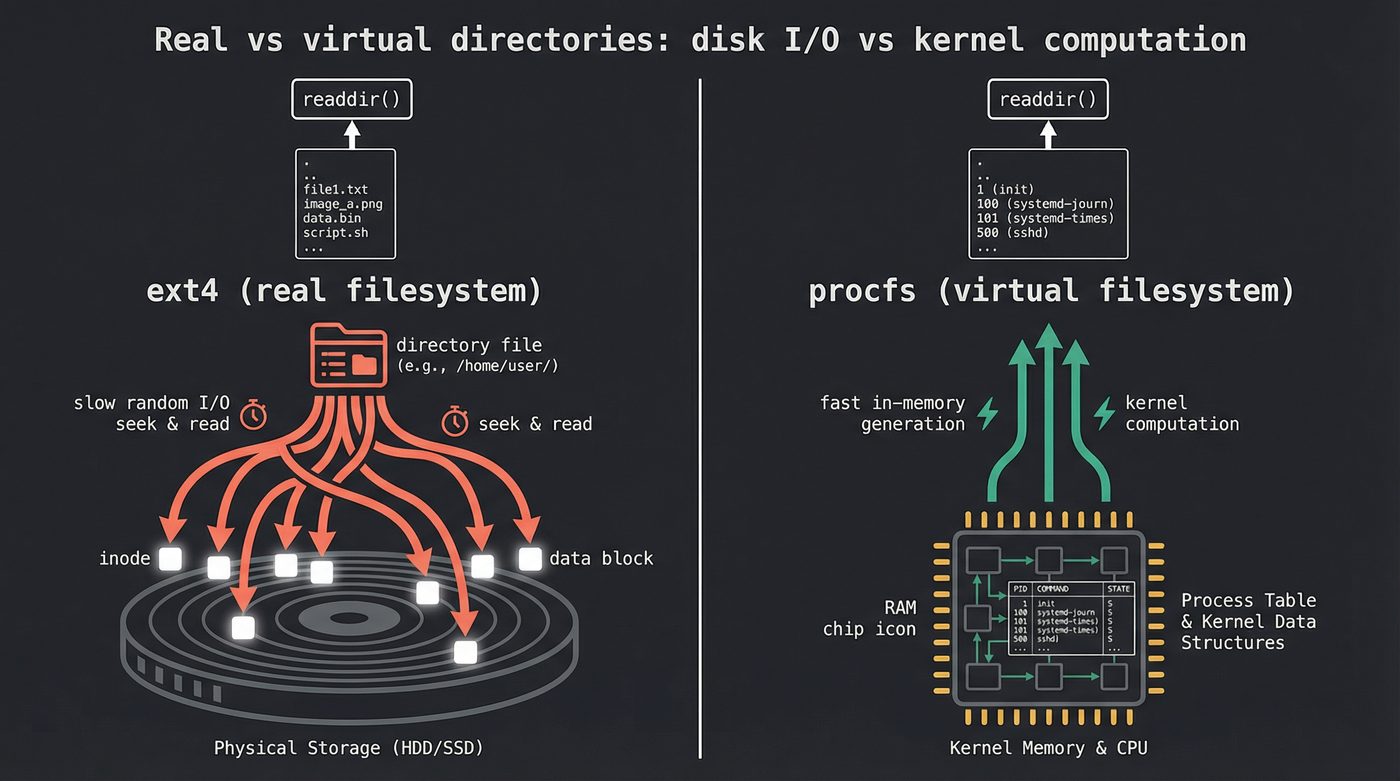
/proc and /sys are virtual filesystems. The kernel generates their contents on the fly. There are no real inodes on any disk. When you readdir() on /proc, the kernel iterates its internal process table and synthesizes directory entries — one per PID.
ls /proc is instant because the "directory entries" are just numbers from an in-memory data structure. No disk reads at all.
But ls -l /proc/*/status is slow. Each stat() call triggers the kernel to collect data from internal structures — the task's memory map, its signal masks, its scheduling statistics. The data has to be computed, not just read. The kernel is doing real work per entry.
This is the same pattern as real directories, but the bottleneck is different. On a real filesystem, stat() is slow because of I/O. On /proc, stat() is slow because of computation. Same symptom, different disease.
If you remember the proc_inspect() function from post 03 (File Descriptors), this is the machinery underneath it. When you read /proc/<pid>/fd/, each entry is a virtual directory entry whose "inode" points to a virtual file that the kernel populates from its file descriptor table. Turtles all the way down.
The Inode Table
Here's where it gets practical.
The number of inodes on an ext4 filesystem is fixed at creation time. mkfs.ext4 calculates how many inodes to create based on the disk size and a bytes-per-inode ratio (default: one inode per 16 KB of space). Once the filesystem is formatted, that number doesn't change.
Which means you can run out of inodes before you run out of space.
$ df -i /
Filesystem      Inodes  IUsed   IFree IUse% Mounted on
/dev/nvme0n1p2  30531584 1247803 29283781    5% /
I've seen this in production exactly once. Once on a mail server where every email was a file (Maildir format — one inode per message, millions of messages). df showed 60% free space, but the filesystem was full. No inodes left. Can't create a single file.
The error message is ENOSPC — "no space left on device." Same error code as running out of disk space. If you're debugging a "disk full" error and df says you have space, check df -i. This one bites people about once per career.
Newer ext4 features like flex_bg group inode tables and block bitmaps together for better locality. But the total count is still fixed at format time. Plan accordingly, or use a filesystem like XFS or Btrfs that grows its inode tables on demand — XFS still has a format-time ceiling (-i maxpct), but within that ceiling it allocates as needed instead of pre-committing everything up front.
Practical Debugging
Want to try everything in this post yourself? Create a test directory with 100,000 files in about 10 seconds:
# Create the playground
mkdir /tmp/inode-test && cd /tmp/inode-test
seq 1 100000 | xargs -P 8 -I {} touch file_{}

# Now feel the difference
time ls -U | wc -l    # instant
time ls -l | wc -l    # noticeably slower
time ls -alrt | tail   # the old-timer's tax
The commands that make inodes tangible:
# Show the raw inode data for a file
$ stat filename

# Show inode numbers alongside filenames
$ ls -i

# Check inode usage on all mounted filesystems
$ df -i

# Poke at ext4 internals directly (read-only is safe)
$ sudo debugfs -R "stat <inode_number>" /dev/nvme0n1p2
Now the one that makes the whole post click. Run this on your test directory:
$ strace -c ls -U /tmp/inode-test/ 2>&1 | tail -3
------ ----------- ----------- --------- --------- ------------------
100.00    0.000256           1       188        55 total

$ strace -c ls -l /tmp/inode-test/ 2>&1 | tail -3
------ ----------- ----------- --------- --------- ------------------
100.00    0.422886           1    301121        62 total
188 syscalls vs 301,121. A quarter of a millisecond vs half a second. Same directory. Same files. The difference is 100,000 newfstatat calls — one for every file — each one chasing an inode. Those stats plus the openat/close pairs needed to touch each entry account for the ~300k extra syscalls. Run it yourself. The abstraction will never be invisible to you again.
When you're done, clean up — and notice that rm on 100,000 files isn't instant either. Each unlink() updates the directory, decrements the inode link count, and potentially frees blocks:
rm -r /tmp/inode-test
The Cache Layer
The page cache — the kernel's mechanism for keeping recently-read disk data in RAM (see post 15) — applies to inodes too. The kernel maintains an inode cache (also called the dcache for directory entries and the icache for inodes) that keeps frequently accessed inodes in memory.
The second ls -l on the same directory is fast because every inode is already in the icache. The thousand stat calls still happen, but each one hits RAM instead of disk. The syscall overhead is still there — you still pay for a million kernel transitions — but the I/O wait disappears.
echo 3 > /proc/sys/vm/drop_caches flushes the page cache, dcache, and icache. Don't run this in production. But on a test system, it's how you simulate a cold cache to see the true I/O cost of ls -l. On a spinning disk with a million files, the difference between a warm and a cold ls -l is something like two orders of magnitude — you go from seconds to minutes. I've never timed it exactly, but you feel it. On NVMe the gap collapses to roughly one order of magnitude — random I/O on SSDs is dramatically faster than spinning rust, but a million random reads is still a million random reads.
Further Reading
ls-alphaon GitHub — the Rust reimplementation oflsthat produced the numbers in this post. Three stat strategies (classic, parallel, io_uring), plus theNameCachethat was the real performance win.- File Descriptors: The Numbers Behind Everything — How the kernel tracks open files, and why deleted files can still consume disk space.
- Reading a File — The VFS layer that sits between your
open()call and the filesystem. - RAM: The Memory You Think You Understand — Page cache, buffer cache, and why free RAM is wasted RAM.
stat(2)man page — The full interface for reading inode metadata.readdir(3)man page — How directory entries are read in userspace.- ext4 Data Structures — Kernel Wiki — The definitive reference for ext4 on-disk layout, including inode tables and htree indexing.
debugfs(8)man page — The tool for poking at ext4 internals without mounting the filesystem.
I'm writing a book about what makes developers irreplaceable in the age of AI. Join the early access list →
Naz Quadri once mass-deleted a log directory only to discover the files were still consuming 400 GB because a forgotten tail -f held every file descriptor open. He blogs at nazquadri.dev. Rabbit holes all the way down 🐇🕳️.