Your Container Is a Lie
Namespaces, Cgroups, and the Illusion of Isolation
Reading time: ~13 minutes
You ran docker run -it ubuntu bash and got a shell. It had its own filesystem, its own process table, its own network interfaces. PID 1 was your bash process. The hostname said something like a3f8b2c91d04. It felt like a tiny virtual machine.
It isn't one. That shell is a regular Linux process running on the same kernel as everything else on your host. Same syscalls. Same CPU. Same scheduler. No hypervisor, no emulation, no second operating system. The kernel is lying to your process about what it can see, and that lie is the entire foundation of container technology.
The Eight Lies
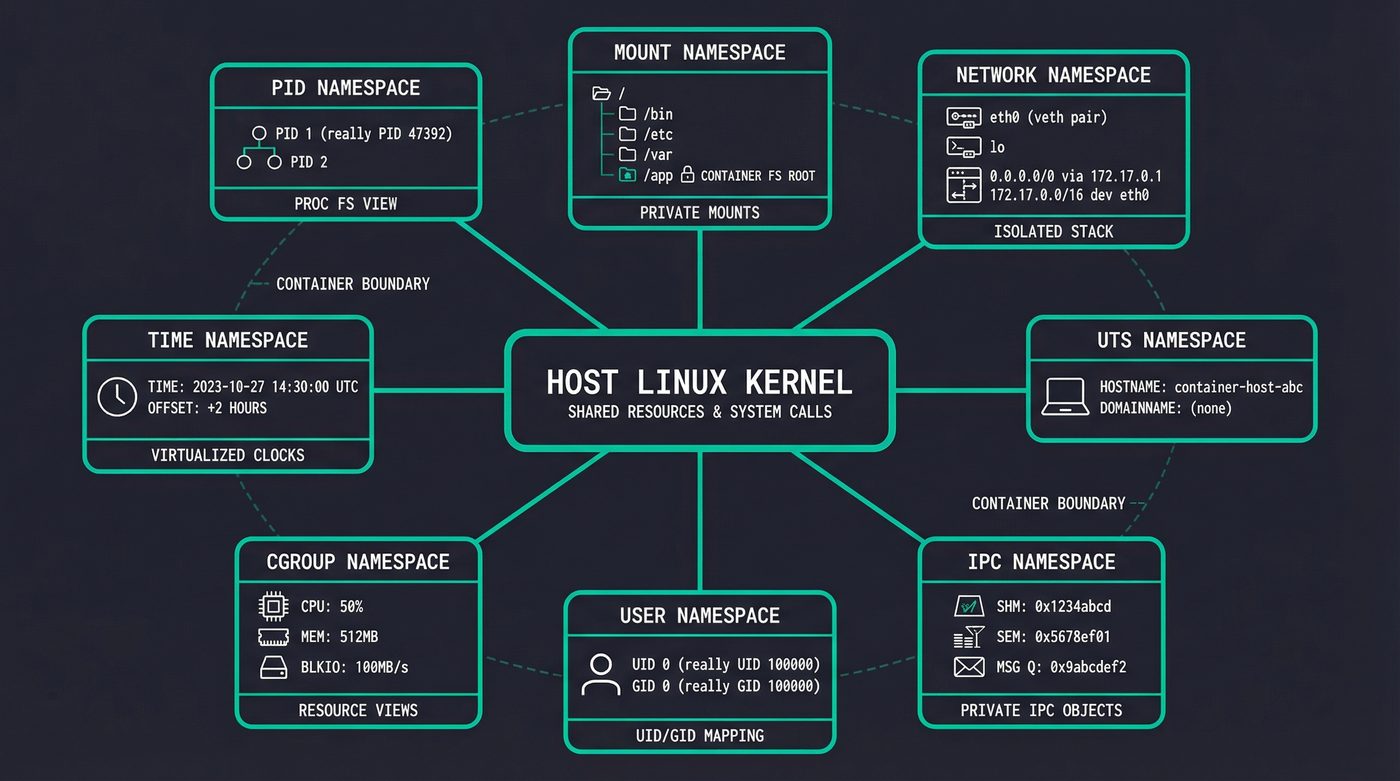
The kernel lies to containerized processes using namespaces. Each namespace hides a different slice of the system. There are eight of them.
PID namespace is the one people notice first. Inside the container, your process is PID 1. On the host, it's PID 47392 or whatever was next in line. The process doesn't know. It calls getpid() and the kernel returns 1, because the kernel maintains a separate PID number space for that namespace. The process genuinely believes it's the init process.
$ docker run -t ubuntu ps aux
USER         PID %CPU %MEM    VSZ   RSS TTY      STAT START   TIME COMMAND
root           1  4.1  0.0   7896  3924 pts/0    Rs+  17:37   0:00 ps aux
One process. PID 1. That's ps itself — the only thing running. On the host, this same process has a five-digit PID and is one of thousands.
Mount namespace gives the container its own filesystem tree. This is why / inside the container shows Ubuntu's filesystem even though the host runs Fedora. The process has its own mount table — changes to it don't affect the host's mounts.
Network namespace is where each container gets its own eth0, its own loopback, its own routing table, its own iptables rules. The container sees one network interface. The host sees dozens of veth pairs connecting containers to bridge networks.
UTS namespace controls the hostname. That random hex string Docker assigns? It's just a namespace. The container calls gethostname() and gets a3f8b2c91d04 while the host returns my-server. Two different answers to the same syscall, decided by which namespace the caller sits in.
$ docker run -t ubuntu hostname
a3f8b2c91d04
IPC namespace isolates System V IPC objects — shared memory segments, message queues, semaphores. Boring but necessary. Without it, one container's shared memory would be visible to every other container.
User namespace is the interesting one from a security perspective. It lets a process be root (UID 0) inside the container while being UID 100000 on the host. This is how rootless containers work. The process thinks it has full privileges. The kernel knows better.
I'm going to skim past cgroup namespace and time namespace — they're real, they matter for nested containers and clock isolation respectively, but they're not what's doing the heavy lifting in a typical docker run.
Building a Container in 20 Lines
You don't need Docker. You don't need containerd. You can build something that functions like a container using three commands that have existed since the early 2000s.
# Create a minimal root filesystem
mkdir -p /tmp/container-root/{bin,proc,sys,dev}
# Copy busybox as our userland (statically linked, no deps)
cp /usr/bin/busybox /tmp/container-root/bin/sh

# Launch a process in new namespaces with its own root filesystem
sudo unshare --pid --mount --uts --net --fork --mount-proc \
    chroot /tmp/container-root /bin/sh
You need sudo — creating PID, mount, and network namespaces is a privileged operation. That's the reality. Rootless containers get around this with user namespaces, but the basic demo needs root.
Now prove you're in a container:
/ # echo $$
1
/ # hostname
(none)
/ # hostname mini-container
/ # hostname
mini-container
/ # ps aux
PID   USER     TIME  COMMAND
    1 root      0:00 /bin/sh
    4 root      0:00 ps aux
/ # pwd
/
/ # ls -l
total 0
drwxrwxr-x    2 1000     1000            60 Apr  6 17:41 bin
drwxrwxr-x    2 1000     1000            40 Apr  6 17:41 dev
drwxrwxr-x    2 1000     1000            40 Apr  6 17:41 proc
drwxrwxr-x    2 1000     1000            40 Apr  6 17:41 sys
PID 1. Empty hostname you can rename without touching the host. Two processes — your shell and ps. A root filesystem with four directories. That's the whole world as far as this process knows. On the host, nothing changed. The hostname is the same. The process table has thousands of entries. The kernel is lying to one process and telling the truth to everyone else.
unshare creates new namespaces. chroot changes the visible root filesystem. --mount-proc mounts a fresh /proc so ps shows only processes in our PID namespace. That's it. That's a container.
The difference between this and Docker is about 50,000 lines of Go — image management, networking, storage drivers, an API server, logging, health checks. But the kernel primitive underneath is unshare. When runc (the actual container runtime) creates a container, it's calling clone() with namespace flags — the same mechanism.
Cgroups: The Resource Cage
Namespaces control what a process can see. Cgroups (control groups) control what a process can use.
Cgroups came from Google. Paul Menage and Rohit Seth submitted patches in 2006 under the name "process containers" — renamed to "control groups" because "container" was already overloaded in kernel terminology. The patches merged into Linux 2.6.24 in January 2008, five years before Docker's first commit. Google needed resource isolation across their fleet: CPU and memory limits per job, accounting, protection against runaway processes starving their neighbours. This was the foundation of Borg, Google's internal cluster manager that was running everything in containers at scale while the rest of us were still SSHing into pet servers.
Borg's ideas eventually became Kubernetes — Google open-sourced the orchestration layer in 2014, a year after Docker made "containers" a household word. The kernel primitives underneath were already old. Docker's innovation was the UX — image layering, a registry, a CLI that made it all accessible. Kubernetes was the orchestration. But cgroups and namespaces? Those were quietly running Google's infrastructure for half a decade before either existed.
When you run docker run -m 512m, Docker creates a cgroup with a memory limit of 512MB and puts your container's process inside it. The process can allocate memory freely — malloc succeeds, pages get mapped, everything works. Until it hits 512MB. Then the kernel's OOM killer activates within that cgroup and kills the process.
This is what confused me for the longest time. The host has 64GB of RAM. free -h on the host shows plenty available. But the container dies at 512MB because the cgroup is a hard wall. The OOM killer doesn't care about total system memory. It cares about the cgroup's limit. If you've read post 10 on malloc and the OOM killer, this is the same mechanism — just scoped to a cgroup instead of the whole system.
CPU limits work differently. --cpus=2 doesn't assign two CPU cores to your container. It uses the CFS bandwidth controller — the completely fair scheduler gives your cgroup a budget of CPU time per period (typically 100ms). Two CPUs means 200ms of CPU time per 100ms period. Your container's processes can run on any core, but they'll get throttled once they've used their budget. This is why a CPU-limited container feels "laggy" rather than simply slow — it bursts to full speed, hits the cap, waits for the next period, bursts again.
Spin up a container with limits and look behind the curtain:
$ docker run -d --name cgroup-demo -m 512m --cpus=2 ubuntu sleep 300

# Find the container's PID on the host
$ docker inspect --format '{{.State.Pid}}' cgroup-demo
589653

# Find its cgroup
$ cat /proc/589653/cgroup
0::/system.slice/docker-aa74d1cd39e7...scope

# Read the memory limit (bytes)
$ cat /sys/fs/cgroup/system.slice/docker-aa74d1cd39e7...scope/memory.max
536870912

# Read the CPU quota
$ cat /sys/fs/cgroup/system.slice/docker-aa74d1cd39e7...scope/cpu.max
200000 100000
536870912 bytes is 512MB. 200000/100000 means 200ms of CPU time per 100ms period — two CPUs. Those two files are the container's resource limits. The kernel reads them on every scheduling decision and every page allocation. Change the number in memory.max and the limit changes immediately — no restart, no API call. It's just a file.
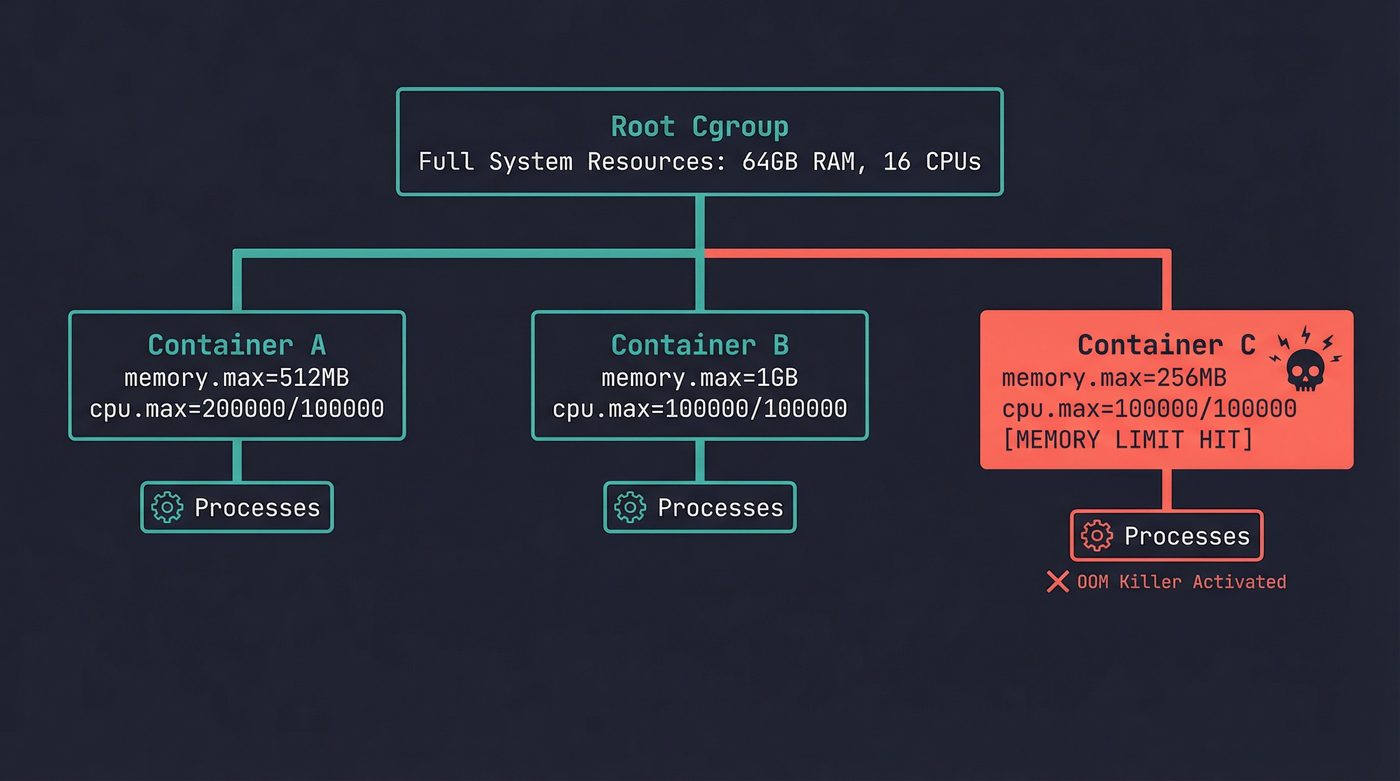
Container C's process tried to allocate past its 256MB limit. The host has 63GB free. Doesn't matter — the cgroup is the boundary, not the machine.
Overlay Filesystems: Layers All the Way Down
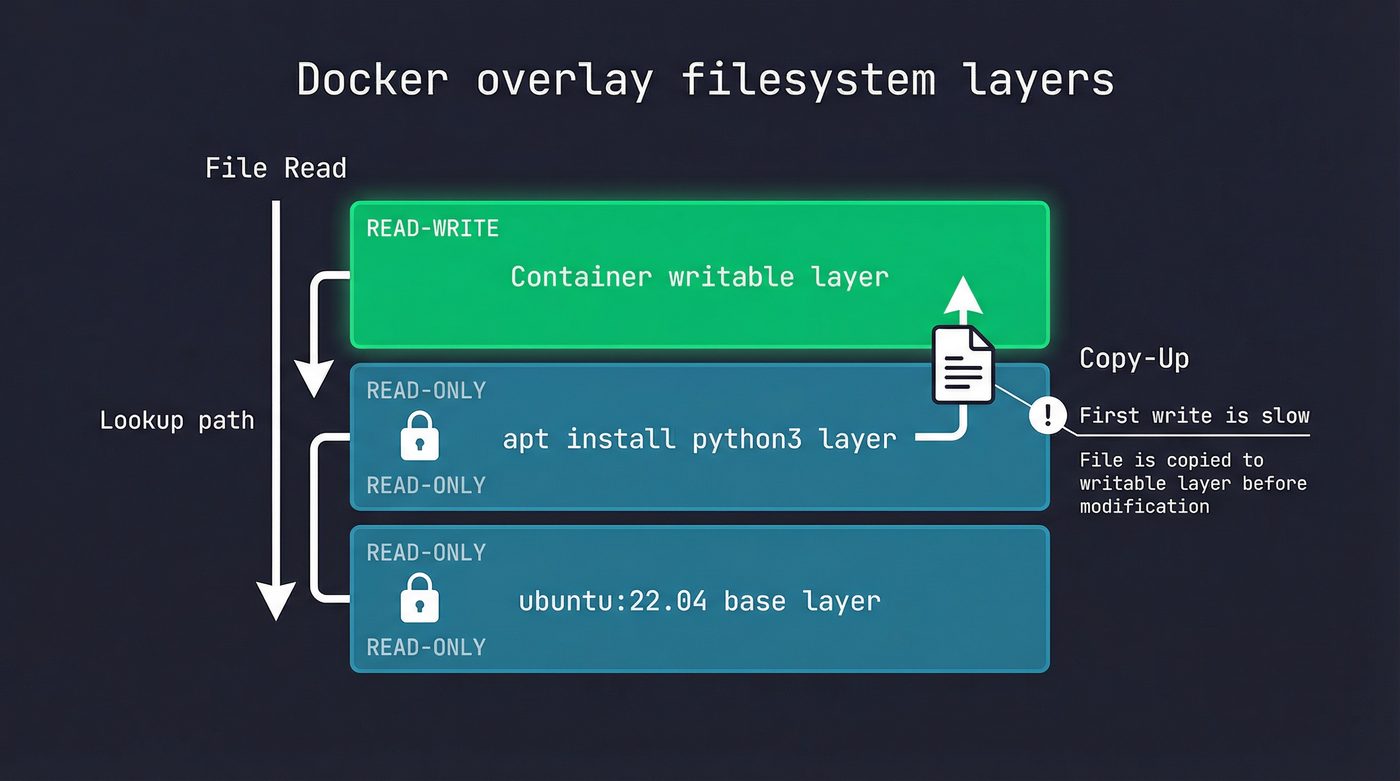
A Docker image isn't a single filesystem. It's a stack of read-only layers with a thin writable layer on top. This is the overlay filesystem, and it's why images are space-efficient and why the first write to an existing file inside a container is slow.
Pull ubuntu:22.04 and you get maybe 4 layers. Pull python:3.12 and it shares the same Ubuntu base layers — Docker doesn't download them again. Ten containers running from the same image share the same read-only layers in memory. Only the top writable layer is unique per container.
When a container reads a file, the overlay driver checks layers top-down. The writable layer first, then each read-only layer in order. First match wins.
When a container writes to a file that exists in a lower layer, the overlay driver performs a copy-up: it copies the entire file from the read-only layer into the writable layer, then applies the write. This is why the first write to a large file in a container takes longer than you'd expect. Subsequent writes to the same file hit the writable layer directly — the copy-up already happened.
This is also why you should never install packages, build your app, and clean up in the same Dockerfile RUN instruction expecting to save space. The deleted files still exist in the layer where they were created. Each RUN creates a new layer. The only way to not ship files is to never create them in the layer you're shipping — which is why multi-stage builds exist.
The Network Plumbing
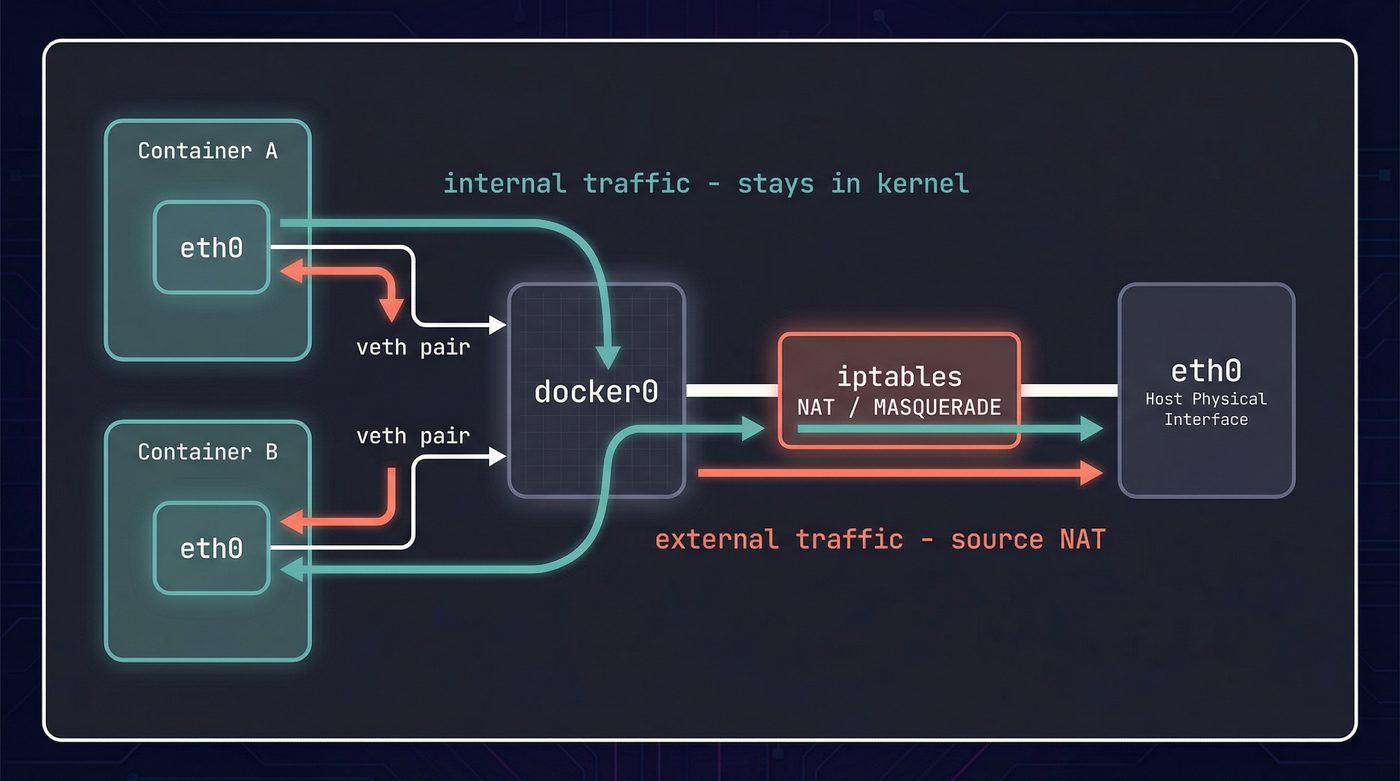
Each container with its own network namespace needs a way to actually send packets. Docker creates a veth pair — a virtual ethernet cable with two ends. One end goes into the container's namespace (becomes eth0), the other stays in the host namespace and attaches to a bridge (typically docker0).
Container-to-container traffic within the same bridge network never leaves the kernel. It crosses the bridge — packet goes out one veth, across docker0, into another veth. Pure kernel forwarding, no physical NIC involved.
Traffic to the outside world gets more involved. The container sends a packet to its default gateway (the bridge). The host has iptables NAT rules (masquerade) that rewrite the source address to the host's IP before forwarding out the physical interface. Return traffic gets reverse-NATted back to the container. Port mappings (-p 8080:80) add DNAT rules so inbound traffic on port 8080 gets routed to port 80 inside the container's namespace.
If you've ever wondered why container networking feels fragile compared to "real" networking — this is why. It's iptables rules, bridge forwarding, NAT, and virtual interfaces all stacked together. One misconfigured rule and your container is unreachable. The file descriptor isolation from post 3 applies here too — the container's socket fds are in its own network namespace. An fd 5 in the container refers to a socket bound to the container's eth0, invisible from the host.
# See the veth pairs Docker created
ip link show type veth

# See the bridge and its attached interfaces
bridge link show

# See the NAT rules Docker added
iptables -t nat -L -n | grep MASQUERADE
What a Container Cannot Protect You From
This is where I get opinionated, and where the "containers are not VMs" distinction stops being academic.
A VM runs a separate kernel. A container shares the host kernel. Every syscall your container makes is handled by the same kernel running on the host. If there's a kernel exploit — a privilege escalation in some obscure ioctl, a race condition in a filesystem driver — a container is no barrier. The attacker escalates through the kernel and they're on the host. Game over.
Docker tries to mitigate this with layers of defense. Linux capabilities restrict what root inside a container can actually do — by default, Docker drops CAP_SYS_ADMIN, CAP_NET_ADMIN, and a bunch of others, so even root in the container can't load kernel modules or change the host's network configuration. Seccomp filters block dangerous syscalls entirely — the default Docker seccomp profile blocks a few dozen dangerous syscalls (the exact count drifts across Docker releases as the kernel gains new syscalls) including mount, reboot, kexec_load. AppArmor or SELinux profiles add mandatory access control on top.
But none of this changes the fundamental architecture: the kernel is shared. /proc inside a container is a namespaced view, but it still exposes kernel information. Signals from post 5 work the same — the kernel dispatches them through the same code paths. The session and process group hierarchy from post 6 applies — container init (PID 1 inside the namespace) needs to handle orphaned children or you get zombies.
The practical implication: if you're running untrusted code, a container is not enough. You need either a VM (separate kernel) or a microVM (Firecracker, gVisor's sentry) that interposes a real isolation boundary. Containers are excellent process isolation for code you trust, running on a kernel you maintain. They are terrible security boundaries for code you don't trust.
This includes the growing trend of running AI agents in containers and calling them "sandboxed." Sticking ClawdBot inside a Docker container does not make it safe to let it execute arbitrary commands. It shares your kernel. If the agent runs something that exercises a kernel bug — a crafted filesystem image, an unusual ioctl, a malicious binary it downloaded from somewhere it shouldn't — the container wall is tissue paper. A container constrains a well-behaved process. It does not contain a determined or compromised one.
The Runtime Landscape
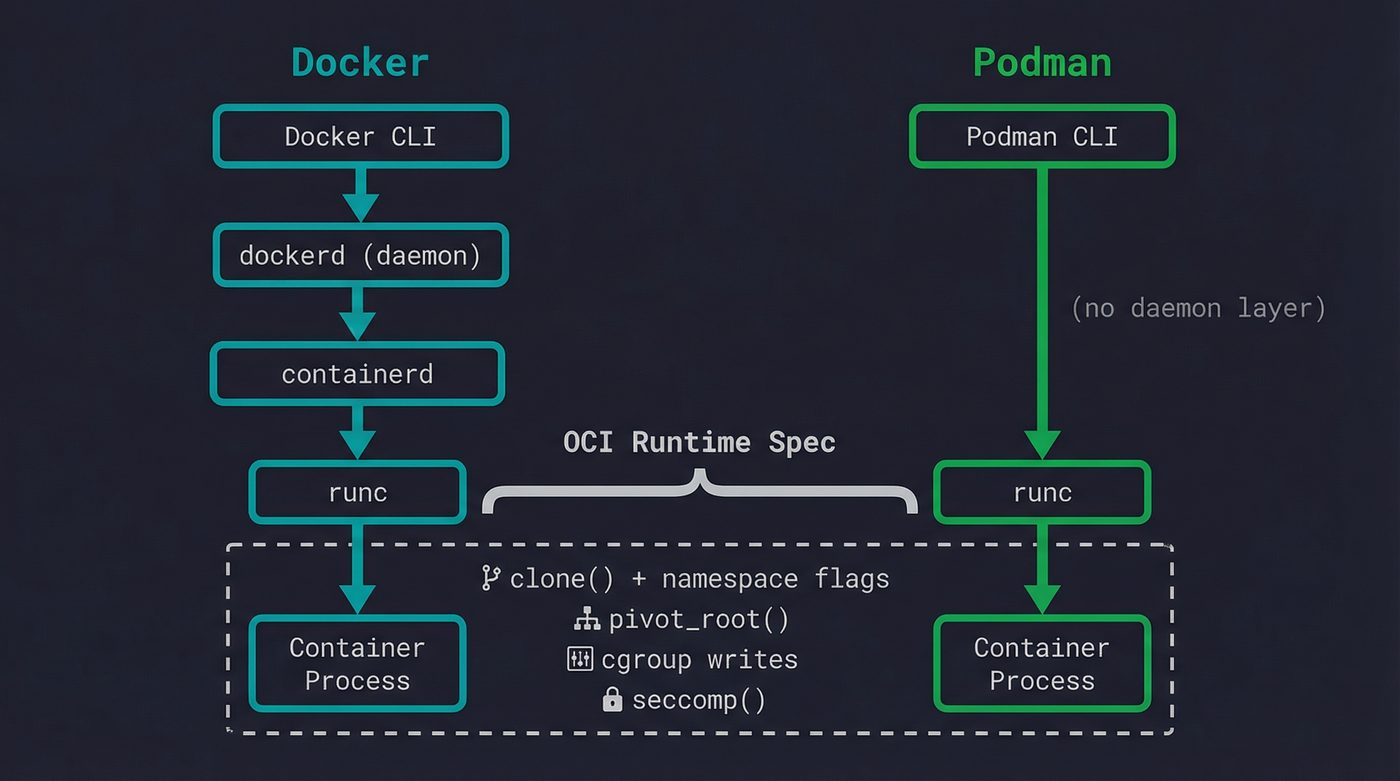
When you type docker run, at least four pieces of software are involved.
Docker CLI parses your command and talks to dockerd (the Docker daemon) via a REST API over a Unix socket. Dockerd manages images, networks, and volumes, then delegates actual container creation to containerd — a lower-level daemon that manages container lifecycles. Containerd in turn invokes runc (or another OCI-compliant runtime) to actually create the namespaces, set up cgroups, pivot root, and exec the container's entrypoint.
The OCI Runtime Specification is what standardized all of this. It defines a JSON config format (config.json) that describes namespaces, mounts, cgroups, capabilities, seccomp profiles — everything a runtime needs to create a container. Runc implements this spec. So does crun (a faster C implementation), youki (Rust), and kata-containers (which cheats by actually spawning a lightweight VM).
Podman skips the daemon entirely. No dockerd, no containerd — the Podman CLI talks directly to an OCI runtime. This means no root daemon running in the background, no single point of failure for all containers on the machine. Each container is a child process of the Podman command that launched it. It's a better architecture for many use cases, and it's why Podman has gained traction in environments where running a privileged daemon feels wrong.
The irony is that the thing most people think of as "Docker" — the container runtime — is actually the least interesting part. The container is just clone() with some flags, pivot_root(), and cgroup writes. The real complexity is in image distribution, layer caching, network management, and orchestration. Kubernetes doesn't talk to Docker anymore (it dropped dockershim in 1.24). It talks to containerd directly.
Why This Matters
Understanding that containers are namespaced processes changes how you debug them. docker exec works because it's just nsenter — entering the namespaces of an existing process. Container networking problems are iptables problems. OOM kills in containers are cgroup limits, not host memory exhaustion. "Container won't start" is often "the entrypoint process exited immediately" — same as any process failing, just harder to see because the namespace vanished with it.
The next time a container crashes on startup and you can't docker exec into it (because there's no running process to attach to), remember: the container is a process. Check the exit code. Check the logs. Run the image with a different entrypoint (docker run -it --entrypoint /bin/sh myimage) and poke around. The debugging tools are the same ones you'd use for any Linux process. They just live behind a namespace boundary.
The layer below Docker is Linux. It always was.
Further Reading
- Post 5: Signals — The Kernel's Interrupt Button — signal handling inside PID namespaces has sharp edges.
- Post 6: Sessions, Process Groups, and Why Ctrl-C Kills the Right Thing — namespace isolation builds on the same process hierarchy.
- Post 3: File Descriptors — The Numbers Behind Everything — socket fds in network namespaces follow the same rules.
- Post 10: malloc, Virtual Memory, and the OOM Killer — cgroup memory limits use the same OOM killer mechanism.
- Containers from Scratch — Liz Rice (2016) — the best conference talk on building a container in Go. 35 minutes well spent.
- OCI Runtime Specification — the spec that runc, crun, youki, and kata all implement.
- namespaces(7) man page — the authoritative reference for Linux namespace types and behavior.
- cgroups(7) man page — control group hierarchy, controllers, and delegation.
I'm writing a book about what makes developers irreplaceable in the age of AI. Join the early access list →
Naz Quadri has mass-produced more container debugging sessions than he'd care to admit, and still reflexively types docker exec into containers that died 30 seconds ago. He blogs at nazquadri.dev. Rabbit holes all the way down 🐇🕳️.