The Linker: Why Argument Order Matters and Everything Else They Never Told You
The Most Confusing Error Message in Programming, Finally Explained
Reading time: ~15 minutes
You've seen this error. Everyone has seen this error.
undefined reference to `PyFloat_AsDouble'
collect2: error: ld returned 1 exit status
I was building a Rust library with PyO3 — the crate that lets you write Python extensions in Rust. The Rust code compiled. The Python bindings looked correct. cargo check passed. Every type matched. And yet the linker — this program you've never thought about, this silent final step in the build process — insisted that PyFloat_AsDouble does not exist.
It does exist. It's in libpython3.12.so. The linker just couldn't find it, because I manage Python with uv and the linker has no idea where uv keeps its interpreters. The system python3 points to one version, uv installed a different one in ~/.local/share/uv/python/, PyO3 found the uv-managed interpreter at build time, but the linker searched /usr/lib and came up empty. Three tools, three different opinions about where Python lives, and the linker is the one that actually has to find the .so at link time. I spent an afternoon chasing PYO3_PYTHON, LD_LIBRARY_PATH, and python3-config --ldflags before pointing the linker at uv's install path. The Rust code was never wrong. The Python bindings were never wrong. The linker's search path was.
The linker is the most important tool in your build chain that you've never been formally introduced to. The compiler gets all the glory. The preprocessor has its own chapter in every C book. But the linker — the program that actually produces the thing you run — gets a shrug and a flag you copy from Stack Overflow.
That ends today.
What a Linker Actually Does
The compiler doesn't produce executables. I need to say that again because the mental model most developers carry is wrong. gcc main.c produces an executable, yes, but only because gcc is secretly running four programs in sequence: the preprocessor, the compiler, the assembler, and the linker. The compiler's actual output is an object file — a .o file — which is machine code that cannot run.
It can't run because it has holes in it — literal gaps where addresses should be, waiting to be filled in. Every time your code calls a function defined in another file, or references a global variable from another translation unit, the compiler writes a placeholder at the call site. "I need the address of calculate_total here, but I don't know it yet. Someone else will fill this in." That someone is the linker.
The linker's job is deceptively simple: take a pile of .o files, resolve all the placeholders, assign final memory addresses, and stitch everything together into a single binary. That's it.
Except it's not "it" at all.
Inside an Object File
Before you can understand linking, you need to see what the linker is working with. An object file is not a blob. It has structure. It's an ELF file (on Linux) with distinct sections, each serving a different purpose. Apologies to our macOS and Windows brethren — your equivalents are Mach-O and PE/COFF respectively, and they solve the same problems with different headers and different headaches. Maybe a comparison post someday. For now, ELF, because that's what I debug 99% of the time.
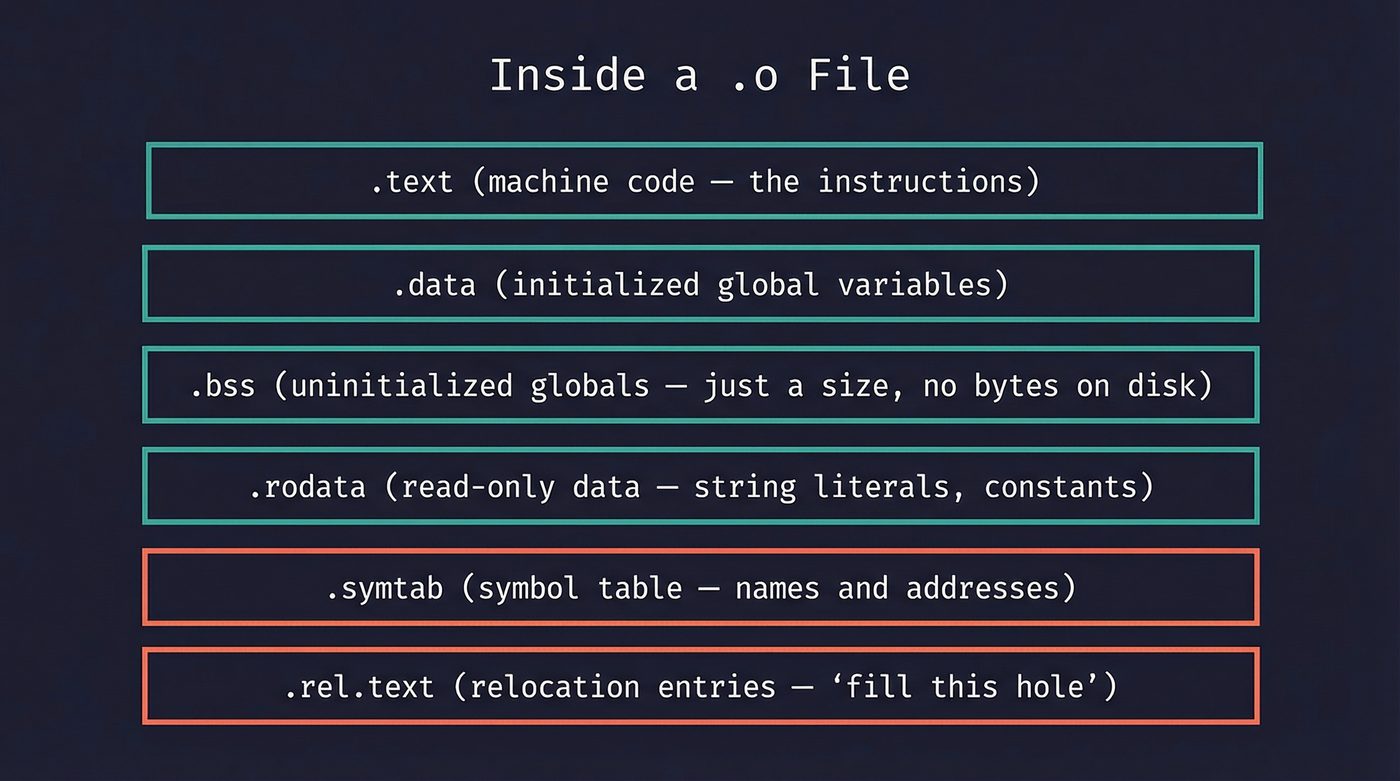
The sections that matter:
.text— your compiled machine code. The actual instructions the CPU executes..data— initialized global and static variables.int count = 42;lives here..bss— uninitialized globals.int buffer[1024];lives here. The clever bit:.bsstakes no space on disk. The loader just allocates zeroed memory at runtime. The name comes from an old IBM assembler directive — "Block Started by Symbol" — and nobody remembers that except people who read books about linkers..rodata— read-only data. Your string literals, yourconstarrays, your lookup tables..symtab— the symbol table. This is what the linker actually reads..rel.text— relocation entries. These are the holes I mentioned. Each one says: "at offset 0x1a in.text, insert the address of symbolcalculate_total."
You can see all of this yourself:
// math_utils.c
int shared_counter = 0;             // GCC puts this in .bss (standard C says .data, but the compiler optimises zero-init away)
const char *VERSION = "1.0";        // pointer in .data, string in .rodata
static int internal_buf[256];       // goes in .bss

int calculate_total(int a, int b) { // goes in .text
    return a + b + shared_counter;
}
$ gcc -c math_utils.c -o math_utils.o

$ nm math_utils.o
0000000000000000 T calculate_total
0000000000000020 b internal_buf
0000000000000000 B shared_counter
0000000000000000 D VERSION
T = defined in .text (code). B = .bss (zero-initialized, uppercase = global). b = .bss (lowercase = local/static — the static keyword made it file-scoped). D = .data (the pointer itself needs storage; the "1.0" string lives in .rodata).
The relocation entries are where it gets interesting:
$ readelf -r math_utils.o
Relocation section '.rela.text' at offset 0x1f8 contains 1 entry:
  Offset          Info           Type           Sym. Value    Sym. Name + Addend
000000000018  000500000002 R_X86_64_PC32     0000000000000000 shared_counter - 4
That R_X86_64_PC32 entry is the hole. The compiler generated code that references shared_counter, but it doesn't know the final address yet. It wrote a placeholder and left a relocation record saying "linker, fill this in." The -4 addend accounts for the PC-relative addressing — the instruction is 4 bytes before the target.
The symbol table is the linker's menu. Every function and global variable gets an entry with three critical pieces of information: its name, its section (or UND for undefined — meaning "I reference this but someone else defines it"), and whether it's local or global.
Symbol Resolution: Where "Undefined Reference" Comes From
The linker maintains two sets as it processes files:
- Defined symbols — symbols it has found definitions for.
- Undefined symbols — symbols that have been referenced but not yet defined.
For every .o file, the linker exports its defined symbols into set 1 and its undefined symbols into set 2. When a symbol appears in both sets — defined in one file, undefined in another — the linker resolves it. It patches the relocation entry with the real address.
When the linker finishes processing all inputs and set 2 is not empty, you get the error. undefined reference to 'calculate_total' means: some .o file referenced this symbol, and no other .o file (or library) provided a definition.
The fix is usually one of three things: you forgot to compile a file, you forgot to link a library, or you misspelled something. But there's a fourth reason that's more insidious — and it's the one that makes the PyO3 story at the top of this post so maddening. The symbol exists. The library exists. The linker just can't find it.
Why Argument Order Matters
This is the thing that makes experienced developers doubt their sanity.
# Say you have a static library libmylib.a containing my_add()

# This works:
$ gcc main.o -L. -lmylib
# ✓

# This fails:
$ gcc -L. -lmylib main.o
/usr/bin/ld: main.o: in function `main':
main.c:(.text+0x13): undefined reference to `my_add'
collect2: error: ld returned 1 exit status
Same files. Same library. Different order. Different result.
Note: this applies to static archives (.a files). Shared libraries (.so) are more forgiving because the dynamic linker resolves symbols at runtime. But static linking is where this bites, and it bites hard.
Here's why. The GNU linker processes arguments left to right, one at a time. For each argument:
- If it's a
.ofile, add all its defined symbols to the defined set, and all its undefined symbols to the undefined set. - If it's a library (
.aarchive), scan it for.ofiles that define symbols currently in the undefined set. Pull out only those.ofiles. Ignore everything else in the archive and move on.
That second rule is the killer. When you write gcc -lmylib main.o, the linker sees libmylib.a first. At that point, the undefined set is empty — it hasn't processed main.o yet. The linker scans the archive, finds nothing it needs, and moves on. Then it processes main.o, which references my_add. Now my_add is in the undefined set. But the archive is in the past. The linker doesn't go back.
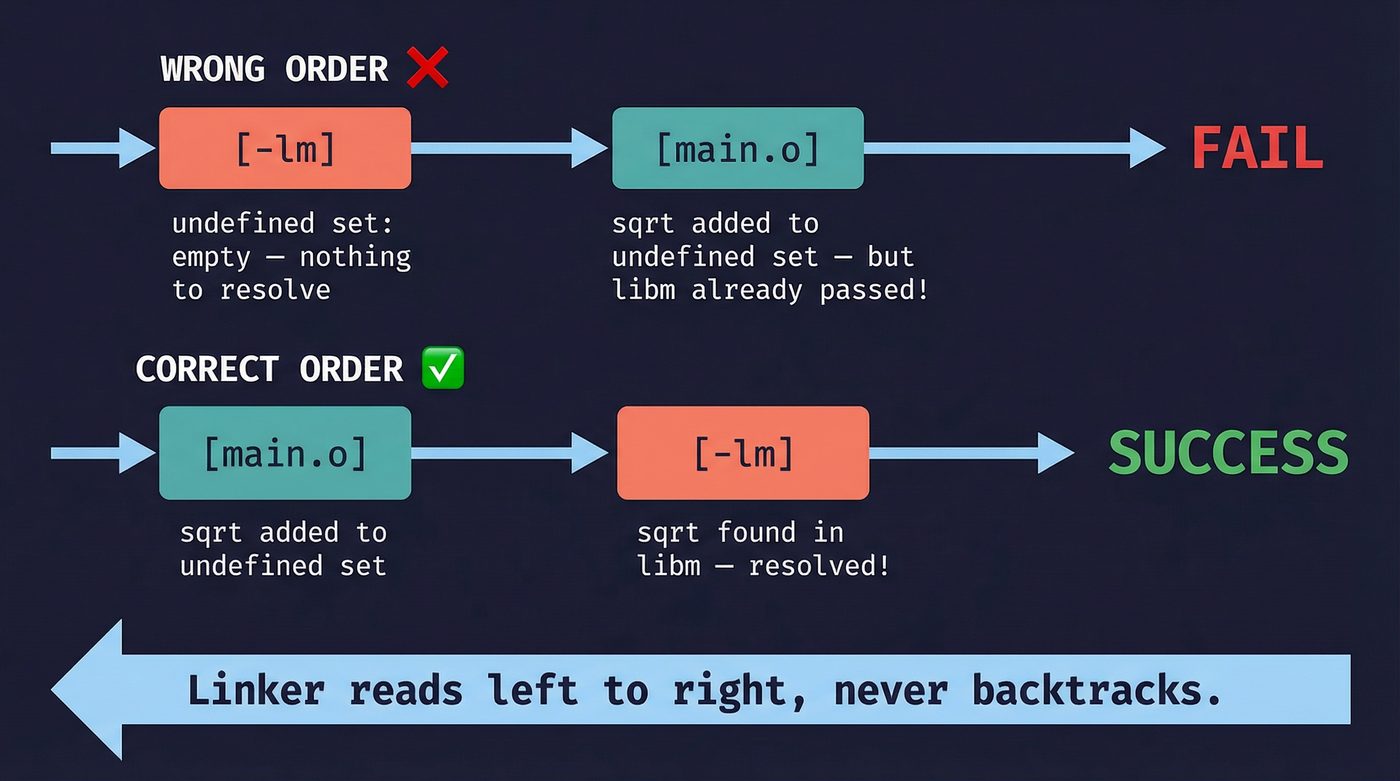
When you write gcc main.o -lmylib, the linker processes main.o first. my_add goes into the undefined set. Then it hits libmylib.a, scans it, finds that my_add is defined there, pulls out that .o file, and resolves the symbol.
This is not a bug. It's a deliberate design choice from the 1970s when memory was scarce and re-scanning libraries was expensive. The linker was designed to make a single pass.
Modern linkers like lld (LLVM's linker) and mold handle this more gracefully — they do a second pass over unresolved symbols instead of giving up after one sweep, so argument order matters less in practice. But the GNU linker ld — what most Linux systems still use by default — enforces strict left-to-right ordering. And even with lld or mold, understanding the single-pass model will save you from circular-dependency nightmares, because --start-group / --end-group is still the incantation when things get hairy.
The rule of thumb: objects and source files first, libraries last. If library A depends on library B, list A before B.
Static Linking: Archives Are Boring (On Purpose)
A static library — a .a file — is not a special format. It's an ar archive. The same ar tool that predates tar. Inside it: a collection of .o files and an index of symbols.
# Create a static library
ar rcs libmath.a add.o multiply.o divide.o

# What's inside?
ar t libmath.a
# add.o
# multiply.o
# divide.o

# What symbols does it export?
nm --defined-only libmath.a
When the linker processes libmath.a, it doesn't include the whole archive. It pulls out only the .o files that resolve currently-undefined symbols. If your program calls add() but not multiply() or divide(), only add.o gets linked. The rest stays in the archive. This is why static libraries don't bloat your binary the way you might expect — dead code elimination starts at the object-file granularity.
Static linking is predictable. The binary is self-contained. It runs on any compatible machine without needing the right version of the right library in the right path. I have a strong opinion about this: for command-line tools and deployment artifacts, static linking is almost always the right default. The Docker container with six layers of shared libraries that only exist to satisfy the dynamic linker is a monument to accidental complexity.
But static linking has a cost. Every statically-linked binary carries its own copy of everything it uses. Ten programs using libz? Ten copies of libz in memory. Security patch to libz? Rebuild and redeploy all ten programs.
That tradeoff is why dynamic linking exists.
Dynamic Linking: The Runtime Linker
A shared library — a .so file on Linux, .dylib on macOS, .dll on Windows — is not linked into your binary at build time. Instead, the static linker writes a note: "this binary needs libm.so.6 at runtime." The actual linking happens when you run the program.
The program responsible for this is ld.so — the runtime linker (also called the dynamic linker). When the kernel loads your ELF binary via execve(), it doesn't jump straight to your main(). It sees the PT_INTERP segment in the ELF header, which says "load /lib64/ld-linux-x86-64.so.2 first and let it set things up." The runtime linker then:
- Reads the binary's
DT_NEEDEDentries to find required shared libraries. - Searches
LD_LIBRARY_PATH,/etc/ld.so.conf, and default paths. - Maps the shared libraries into the process's address space.
- Resolves symbols.
But step 4 is where it gets interesting, because the runtime linker doesn't resolve everything immediately.
PLT and GOT: Lazy Binding
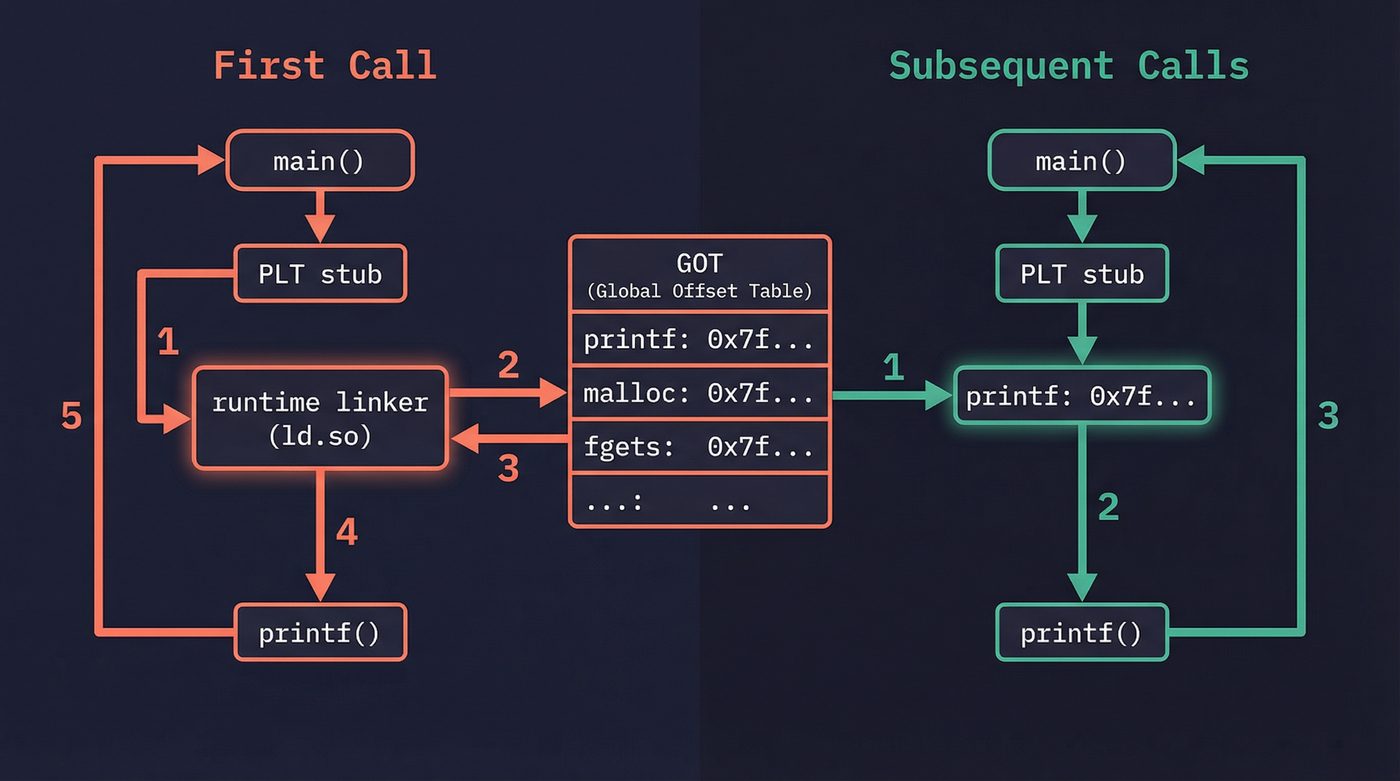
When your code calls printf() from libc, it doesn't call printf() directly. It calls a small stub in the Procedure Linkage Table (PLT). The first time this stub runs, it jumps to the runtime linker, which looks up the real address of printf(), writes it into the Global Offset Table (GOT), and then jumps to printf(). Every subsequent call goes through the PLT stub, but now the GOT already has the address, so the stub jumps directly to printf() without involving the runtime linker.
This is lazy binding. The cost of resolving symbols is paid only for functions you actually call, and only on the first call. Clever.
You can see this in action:
# See the PLT entries (bash is dynamically linked; your ls might not be
# if you're running uutils coreutils — check with `file /bin/ls`)
$ objdump -d /usr/bin/bash | grep '@plt' | head -5
   2f040:  jmp    2f020 <unlink@plt-0xe20>
   2f050:  jmp    2f020 <unlink@plt-0xe20>
   2f060:  jmp    2f020 <unlink@plt-0xe20>

# See the GOT (modern PIE binaries use .got, not .got.plt)
$ readelf -x .got /usr/bin/bash | head -5

# Watch the runtime linker do its thing
$ LD_DEBUG=bindings ./my_program 2>&1 | head -20
LD_DEBUG is one of the most underused debugging tools in existence. Set it to libs to see library search paths, symbols to see symbol resolution, bindings to see every PLT resolution. It's noisy, but when you're tracking down a symbol versioning nightmare, it's the only thing that helps.
LD_PRELOAD: The Override Switch
The runtime linker checks LD_PRELOAD before any other library. If you define a function in a preloaded library that has the same name as a function in libc, yours wins. The program calls your version instead.
# intercept_malloc.c — wrap malloc to log allocations
# (compile with: gcc -shared -fPIC -o intercept.so intercept_malloc.c -ldl)

LD_PRELOAD=./intercept.so ./my_program
This is how AddressSanitizer works. When you compile with -fsanitize=address, the compiler instruments your code, and at runtime a preloaded library intercepts malloc, free, memcpy, and dozens of other functions to check for buffer overflows and use-after-free. ThreadSanitizer, LeakSanitizer — same mechanism.
LD_PRELOAD is power without guardrails. It lets you patch a running system without recompiling. It also lets an attacker inject code into any dynamically-linked program. That's why setuid binaries ignore LD_PRELOAD — the runtime linker strips it when the effective user ID doesn't match the real user ID. Security through "we thought of that."
Position Independent Code
Shared libraries have a problem. They can be loaded at any address — the kernel's ASLR (Address Space Layout Randomization) deliberately randomizes where they land. But machine code contains hardcoded addresses for global variables and function calls. If libfoo.so is compiled expecting to be loaded at address 0x400000, and the kernel loads it at 0x7f3a8b000000, every address in the code is wrong.
Position Independent Code (PIC) solves this. When you compile with -fPIC, the compiler generates code that never uses absolute addresses. Instead, it accesses global data through the GOT — a table of pointers that the runtime linker fills in with the correct addresses after loading. Function calls go through the PLT. The code itself can live anywhere in memory without modification.
This is why you sometimes see -fPIC in compiler flags for shared libraries and wonder what it does. It makes the code relocatable. Without it, the shared library would need to be patched in memory every time it's loaded at a different address — which defeats the purpose of sharing.
There's a performance cost. Every global variable access adds an indirection through the GOT. In practice, the cost is negligible on modern hardware. The branch predictor and L1 cache make the extra load invisible in most workloads. But in tight numerical loops, it's measurable — which is why some HPC code is still statically linked.
Symbol Visibility: Controlling Your Library's Surface Area
By default, every function and global variable in a shared library is visible to the linker. This is terrible for three reasons: it pollutes the global namespace, it prevents the compiler from optimizing (it can't inline a function that might be overridden), and it slows down loading (more symbols to resolve).
GCC's -fvisibility=hidden flips the default. Now nothing is exported unless you explicitly mark it:
// Only this function is visible to users of the library
__attribute__((visibility("default")))
int public_api_function(int x) {
    return internal_helper(x) + 1;
}

// This is hidden — callers can't see it, linker can't find it
static int internal_helper(int x) {  // static already hides it
    return x * 2;
}
// Rust does this right by default — only `pub` items are visible
// For FFI, you explicitly opt in:
#[no_mangle]
pub extern "C" fn public_api_function(x: i32) -> i32 {
    internal_helper(x) + 1
}

fn internal_helper(x: i32) -> i32 { x * 2 }
Every major library does this. Qt, GTK, Firefox, Chrome — they all compile with hidden visibility and explicitly export their public API. If you're writing a shared library and you're not doing this, you're leaking implementation details and leaving performance on the table.
ELF: What the Kernel Actually Loads
I'm glossing over a big distinction here that matters when debugging. An ELF file has two views:
- Sections — the compiler's view.
.text,.data,.bss,.rodata,.symtab. Used by the linker. - Segments — the kernel's view. Groups of sections with the same permissions. Used by the loader.
The kernel doesn't care about sections. When you call execve(), the kernel reads the program header table, which describes segments: "load bytes 0x1000–0x5000 as read+execute (that's your code), load bytes 0x6000–0x7000 as read+write (that's your data)." Sections are metadata for the toolchain. You can strip them entirely (strip --strip-all binary) and the program still runs.
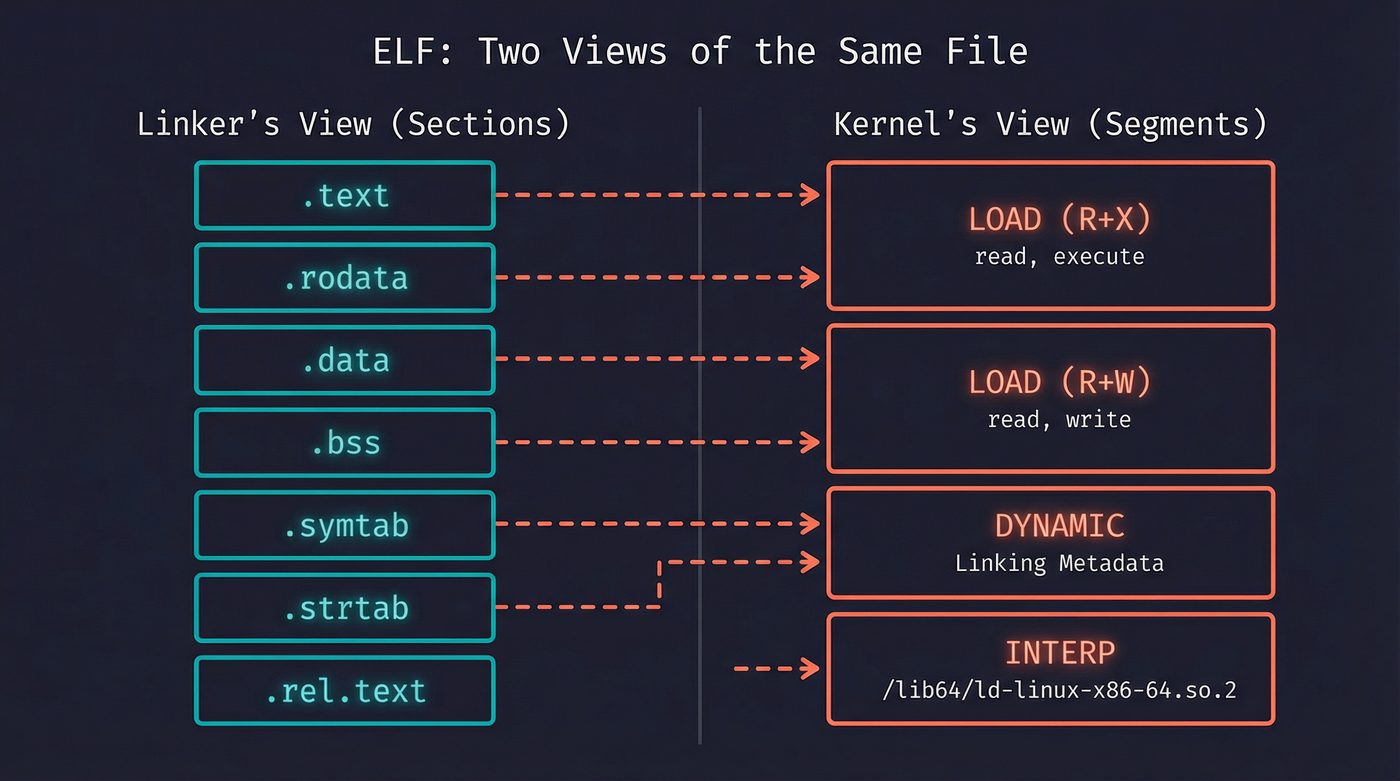
This dual structure is why readelf -S (sections) and readelf -l (segments/program headers) show different things. Both are correct. They're different views of the same file for different consumers.
The Debugging Toolkit
When linking goes wrong, these four tools are what you reach for.
nm — list symbols in an object file or binary. The first tool you should run when you see "undefined reference." Does the symbol exist? Is it defined (T, D, B) or undefined (U)? Is it mangled?
nm -C my_library.o    # -C demangles C++ names
# 0000000000000000 T calculate_total    ← defined, in .text
#                  U sqrt               ← undefined, needs libm
ldd — list shared libraries a binary depends on. When your program works on your machine but not in production, ldd shows you what's missing — a true unsung hero.
ldd /usr/bin/python3
# linux-vdso.so.1 (0x00007ffc...)
# libpython3.12.so.1.0 => /usr/lib/libpython3.12.so.1.0
# libm.so.6 => /lib/x86_64-linux-gnu/libm.so.6
# libc.so.6 => /lib/x86_64-linux-gnu/libc.so.6
# /lib64/ld-linux-x86-64.so.2
readelf — the Swiss Army knife for ELF files. Sections, segments, symbols, relocations, dynamic entries, version info. If it's in the ELF format, readelf can show it.
objdump — disassembly and section contents. When you need to see the actual machine code or verify that a relocation was applied correctly, objdump -d is what you want.
patchelf — modifies ELF binaries without recompiling. Change the RPATH, strip hardcoded library paths, fix the SONAME, even rewrite the interpreter path. Remember my failing PyO3 linker errors? maturin used to depend on patchelf to strip build-machine RPATHs from .so files before packaging them into Python wheels — without it, the wheel would ship with paths like /home/nazq/.rustup/toolchains/... baked in, and break on every other machine. maturin eventually wrote its own ELF patcher in Rust to drop the external dependency, but patchelf is still the fastest way to diagnose and fix RPATH issues on any binary. patchelf --print-rpath and patchelf --print-needed tell you exactly what a binary expects, and --set-rpath '$ORIGIN' makes it portable.
And then there's the one most people forget: LD_DEBUG. It's not a separate tool — it's an environment variable that makes the runtime linker talk. Set it to all if you want to drink from the firehose.
Common Linker Errors (Translated to English)
undefined reference to 'foo' — A .o file references symbol foo, and no other .o file or library defines it. Either you forgot to compile the source file, forgot to link the library (-lfoo), or misspelled the function name. In C++, check name mangling — extern "C" might be missing.
multiple definition of 'foo' — Two .o files both define the same global symbol. You probably defined a function in a header file without marking it static or inline, and it got compiled into multiple translation units.
cannot find -lfoo — The linker can't find libfoo.so or libfoo.a in its search path. Install the dev package (libfoo-dev on Debian, foo-devel on Fedora) or add the path with -L.
version 'GLIBC_2.34' not found — Your binary was linked against a newer glibc than the target system has. This is the "works on my machine" of the Linux world. Compile on the oldest distro you need to support, or statically link, or use a compatibility layer.
missing -lm — The classic. math.h functions like sqrt, sin, cos live in libm, which is separate from libc. The compiler won't tell you. The linker will, cryptically.
Tying It Together
The linker is the seam between compilation and execution. Your source code becomes tokens, becomes an AST, becomes IR, becomes machine code in .o files (I walked through this pipeline in post 11). But those .o files are fragments. They reference each other. They have holes where addresses should be. The linker fills those holes, merges the fragments, and produces the thing the kernel can actually execve(), which hands it to the loader.
The runtime linker extends this into the running process. The PLT and GOT turn the problem of "where is this function" into a lazy lookup. LD_PRELOAD turns it into a power tool for debugging and a vector for exploitation. close-on-exec flags (covered in post 03) ensure that file descriptors don't leak across the exec boundary while the runtime linker is doing its work.
Every layer connects. That's not a coincidence. It's engineering.
Further Reading
- Post 11: How Your Python Code Actually Runs — The compilation pipeline from source to machine code.
- Post 03: File Descriptors — exec, close-on-exec, and what happens to open files.
- Linkers and Loaders — John R. Levine's definitive book on the subject. Published in 1999 and still relevant because the fundamentals haven't changed.
- Ian Lance Taylor's 20-part blog series on linkers — A Google engineer explains linkers from first principles. The best free resource on the topic.
- man ld.so — The runtime linker's manual page. Documentation for LD_PRELOAD, LD_DEBUG, and library search order.
- man nm — Symbol table tool reference.
- man readelf — ELF file inspection tool reference.
I'm writing a book about what makes developers irreplaceable in the age of AI. Join the early access list →
Naz Quadri has typed -lfoo more times than he'd like to admit, usually through trial, error, and Stack Overflow at 1 AM. He blogs at nazquadri.dev. Rabbit holes all the way down 🐇🕳️.