The Tunnel You Type Through
SSH: Key Exchange, Channel Multiplexing, and the Double PTY
Reading time: ~15 minutes
You type ssh my-server.my-domain.com. A connection opens. Within a second, you're typing commands on a machine three time zones away, watching output render in real time. Behind that single command: a Diffie-Hellman key exchange, a host verification that your future security depends on, a channel multiplexer carrying your shell session alongside who-knows-what-else, and two PTY pairs -- one local, one remote -- stitched together through an encrypted tunnel.
This is the most important protocol most developers never look inside.
I used to think of SSH as "encrypted telnet", stop laughing! That's like calling a submarine "a boat that goes underwater" -- technically accurate, completely missing the engineering. SSH is a multiplexed, authenticated, encrypted transport protocol that happens to be really good at carrying interactive shells. It can also carry file transfers, TCP tunnels, X11 forwarding (meh, kind of), and SOCKS proxies. All at the same time. Over a single TCP connection.
The Transport Layer: Building an Encrypted Pipe
Before SSH can do anything useful, it needs to establish an encrypted connection between your machine and the server. This happens in the SSH transport layer, defined in RFC 4253. If you've read the TLS post (post 20), some of this will feel familiar. The problems are the same. The solutions are different enough to matter.
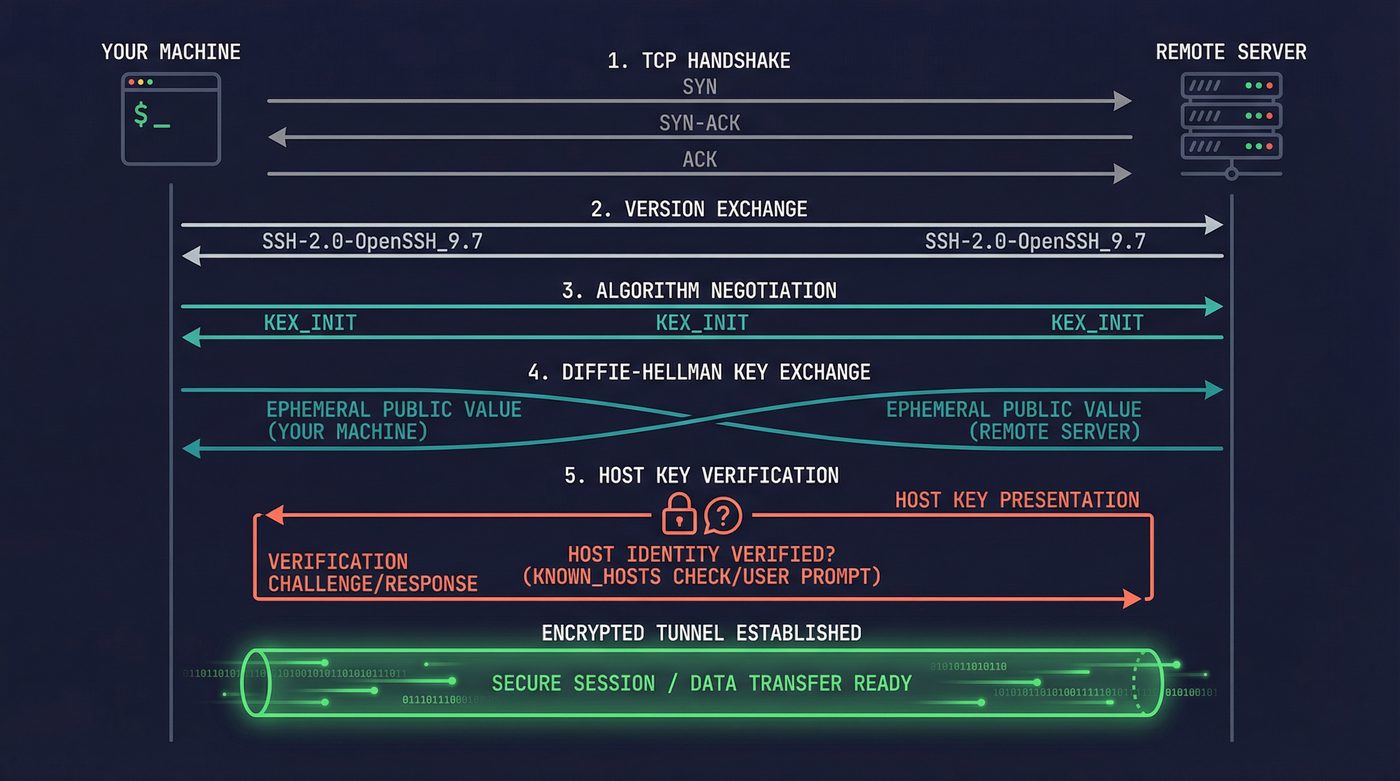
The sequence looks like this:
Client                                Server
  |                                     |
  |--- TCP handshake (SYN/SYN-ACK)  --->|
  |                                     |
  |<-- "SSH-2.0-OpenSSH_9.6"  ----------|
  |--- "SSH-2.0-OpenSSH_9.7p1"  ------->|
  |                                     |
  |<--- Algorithm negotiation  -------->|
  |     (KEX_INIT both directions)      |
  |                                     |
  |<--- Diffie-Hellman exchange  ------>|
  |     (client and server each         |
  |      contribute a public value)     |
  |                                     |
  |<-- Host key + signature ------------|
  |                                     |
  |=== Encrypted channel established ===|
First, the version exchange. Both sides send a version string. This is plain text, no encryption yet. You can see it yourself: nc some-server 22 and the first thing back is something like SSH-2.0-OpenSSH_9.6. This is the server telling you what protocol version and implementation it's running. That information leaks by design.
Then comes algorithm negotiation. Both sides send a KEX_INIT packet listing every algorithm they support, in preference order: key exchange methods, host key types, ciphers, MACs, compression. The first algorithm in the client's list that the server also supports wins. This is why the client's preference order matters -- the server doesn't pick its favorite, it picks the client's favorite from the set of algorithms they share.
The Key Exchange
The key exchange is where the magic happens. Modern SSH uses curve25519-sha256 -- an elliptic curve Diffie-Hellman exchange using Daniel Bernstein's Curve25519. Older servers might negotiate diffie-hellman-group14-sha256 or worse.
The core idea is the same one TLS uses: two parties who've never met compute a shared secret over an insecure channel, and anyone watching the exchange can't reconstruct the secret. Client generates an ephemeral keypair, sends the public half. Server generates an ephemeral keypair, sends the public half. Both sides independently compute the same shared secret. An eavesdropper who captured both public values still can't derive the secret -- that's the discrete logarithm problem, and on Curve25519 it's computationally infeasible.
From that shared secret, SSH derives the session keys: one for client-to-server encryption, one for server-to-client, plus integrity keys for both directions.
The Host Key: Trust on First Use
Here's where SSH diverges from TLS in a way that matters.
TLS has certificate authorities -- a hierarchy of trusted third parties who vouch for server identities. SSH has nothing. No CA. No hierarchy. Just you, the server, and a question: "Do you trust this key?"
The authenticity of host 'server.example.com (203.0.113.42)' can't be established.
ED25519 key fingerprint is SHA256:xK3rV...dF8=.
Are you sure you want to continue connecting (yes/no/[fingerprint])?
Every developer has seen this message. Almost every developer types yes without thinking. That's TOFU (guys I'm serious, it's called TOFU 😂) -- Trust On First Use. You're telling SSH: "I believe this server is who it claims to be, and I want to remember this key forever." SSH stores the key in ~/.ssh/known_hosts and from that moment on, it will verify that the server presents the same key on every future connection.
This is the security model. There's no certificate chain to validate. No third-party authority. The first time you connect, you're vulnerable. If someone is intercepting your traffic during that first connection, you've just trusted their key. Every subsequent connection is verified against that first trust decision.
The scary warning:
@@@@@@@@@@@@@@@@@@@@@@@@@@@@@@@@@@@@@@@@@@@@@@@@@@@@@@@@@@@
@    WARNING: REMOTE HOST IDENTIFICATION HAS CHANGED!     @
@@@@@@@@@@@@@@@@@@@@@@@@@@@@@@@@@@@@@@@@@@@@@@@@@@@@@@@@@@@
IT IS POSSIBLE THAT SOMEONE IS DOING SOMETHING NASTY!
This means the server's host key doesn't match what's in your known_hosts. Either the server was reinstalled, its keys were rotated, or someone is intercepting your connection. The terrifying all-caps warning is appropriate -- you genuinely cannot tell which one it is. I've seen people reflexively delete the known_hosts entry and reconnect. That defeats the entire point of host key verification. If the server legitimately changed keys, verify through an out-of-band channel. If you can't verify, you have a problem.
Authentication: Proving You Are Who You Claim
Once the encrypted channel is up, SSH needs to verify your identity. There are several methods, and my opinions on them are strong.
Password Authentication
Terrible. Disable it. I don't care about your use case.
Password auth sends your password over the encrypted channel (at least it's not plain text), but it's vulnerable to brute force, credential stuffing, and the fundamental problem that passwords are things humans choose. Every SSH honeypot logs thousands of root/admin/password123 attempts per hour. The bots never sleep.
PasswordAuthentication no in your sshd_config. End of discussion.
Public Key Authentication
This is the baseline for anyone who takes security seriously. You generate a keypair (I recommend ssh-keygen -t ed25519), put the public half in ~/.ssh/authorized_keys on the server, and keep the private half on your machine. During authentication, the server sends a challenge, your client signs it with your private key, and the server verifies the signature against the public key it has on file.
Your private key never leaves your machine. Never crosses the wire. The server never sees it. This is fundamentally different from password auth, where the secret (your password) is transmitted.
SSH Agent
Typing your key passphrase every time you connect gets old fast. The SSH agent solves this. ssh-agent is a daemon that runs in the background, holds your decrypted private keys in memory, and performs signing operations on behalf of SSH clients.
The mechanism is a Unix domain socket. When you run ssh-add, your key gets decrypted and loaded into the agent's memory. The agent's socket path lives in SSH_AUTH_SOCK. When ssh needs to authenticate, it doesn't read your key file -- it connects to the agent socket and asks it to sign the challenge. The agent signs it and returns the signature. The private key material never leaves the agent process.
This is why SSH_AUTH_SOCK matters. If you've ever had SSH auth mysteriously fail after switching tmux sessions or sudo-ing to another user, it's because the new environment doesn't have SSH_AUTH_SOCK pointing at the running agent.
Agent Forwarding: Convenient and Dangerous
ssh -A enables agent forwarding. This lets you hop from machine A to machine B to machine C, using the keys stored in machine A's agent at every hop. Convenient for bastion host setups. Also a meaningful security risk.
When you forward your agent to a remote host, the root user on that host (or anyone who can access your forwarded socket) can use your keys to authenticate as you to any other system. They can't extract the keys -- the agent only performs signing operations -- but they can use the agent to authenticate wherever your keys are authorized. For the duration of your connection, the remote root owns your SSH identity.
Use ProxyJump instead. I'll get to that.
Certificate-Based Authentication
The best option. Almost nobody uses it.
Instead of distributing public keys to every server's authorized_keys, you set up an SSH Certificate Authority. The CA signs user keys, and servers trust any key signed by the CA. You can set expiration times, restrict which principals (usernames) a certificate allows, and revoke certificates centrally.
It's the same idea as TLS certificates from post 20, applied to SSH. It solves the authorized_keys management nightmare that hits around the 50-server mark. Facebook, Google, and Netflix all use it internally. Most shops with fewer than a hundred servers never bother.
I use it on my home dev network — about 10 machines. The setup took 20 minutes and I haven't touched an authorized_keys file since:
# 1. Generate the CA key pair (once, guard the private key with your life)
ssh-keygen -t ed25519 -f ~/.ssh/home_ca -C "home-ca"

# 2. On every server, tell sshd to trust your CA
#    Add to /etc/ssh/sshd_config:
#      TrustedUserCAKeys /etc/ssh/home_ca.pub
#    Copy the public key and restart sshd:
scp ~/.ssh/home_ca.pub server:/etc/ssh/home_ca.pub
ssh server 'sudo systemctl restart sshd'

# 3. Sign your key (valid 12 hours, for user "nazq")
ssh-keygen -s ~/.ssh/home_ca -I "nazq@workstation" -n nazq -V +12h ~/.ssh/id_ed25519.pub

# 4. SSH to any server — no authorized_keys entry needed
ssh nazq@server3
The -V +12h is the part that makes this worth it. The certificate expires automatically. No stale keys sitting on servers forever, no revocation lists to maintain, no "who added this key and when" archaeology. When I need access, I sign a cert. When 12 hours pass, it's dead. Add a new server to the network? Copy one public key to one file, restart sshd. That's it.
Channels and Multiplexing
Here's where SSH earns its keep as a protocol and not just "encrypted telnet."
A single SSH connection can carry multiple channels simultaneously. Your interactive shell is one channel. An SFTP file transfer is another. A port forward is another. Each channel has its own flow control, its own window size, and its own data stream. They all share the same encrypted TCP connection.
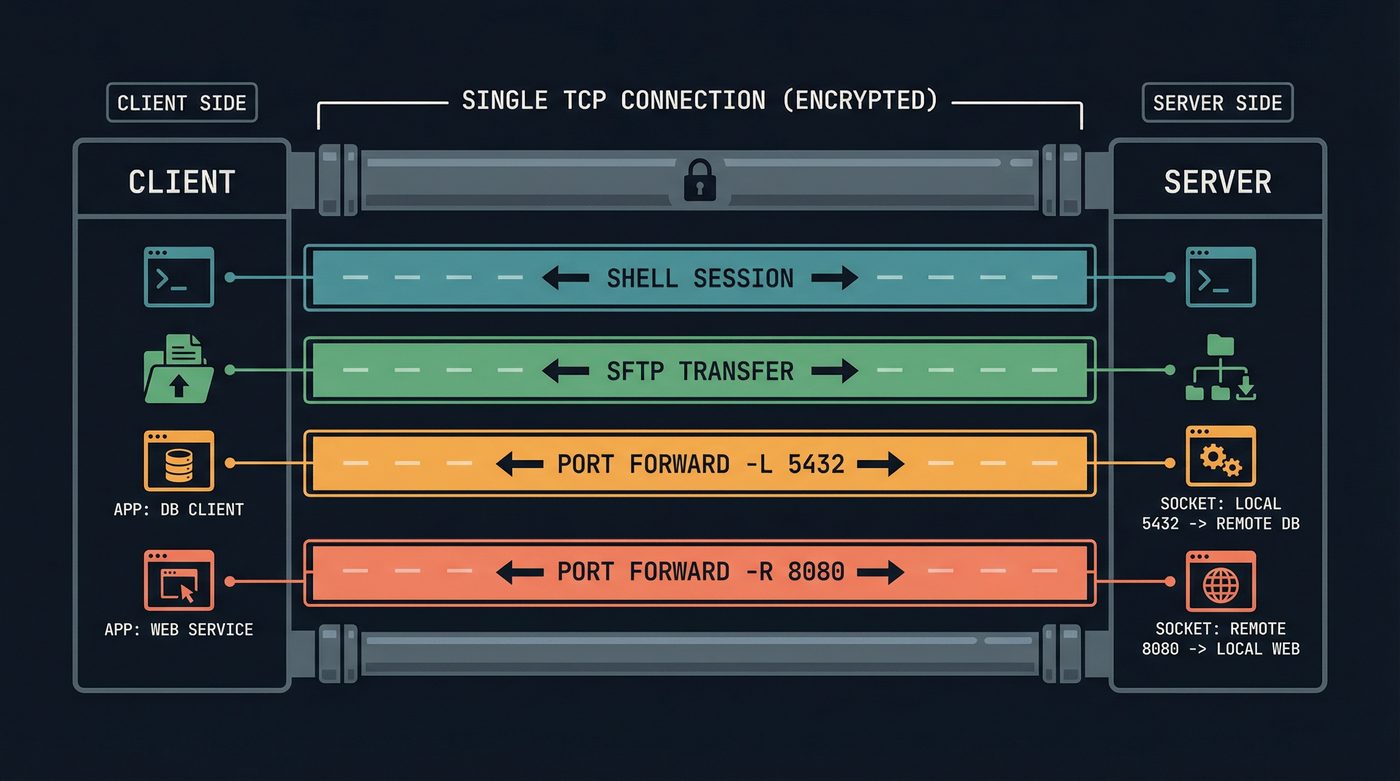
This is why you can be in an interactive SSH session, hit ~C (escape, then capital C) to drop into the SSH command line, add a port forward on the fly, and go back to your shell. The new port forward opens as a new channel on the existing connection.
The channel multiplexing is also why SSH connections are resilient to partial failures. If an SFTP transfer stalls, your shell session keeps working. Different channels, same pipe.
Port Forwarding: The Sysadmin's Swiss Army Knife
SSH port forwarding has saved more production incidents than I can count. Three flavors, each for a different problem.
Local Forwarding (-L)
ssh -L 5432:db-server:5432 bastion
This binds port 5432 on your local machine. Connections to localhost:5432 get tunneled through the SSH connection to the bastion host, which then connects to db-server:5432. Your local application thinks it's talking to a local Postgres. The traffic actually traverses an encrypted tunnel, through a bastion host, to a database server that's not exposed to the internet.
I've used this to connect a local pgAdmin to a production database behind three layers of firewalls during an incident. The database had no public IP. The bastion host did. One SSH command and I had a secure tunnel, and a restored sense that the problem was tractable. -L is the one I reach for most often.
The reverse flavor, -R (ssh -R 8080:localhost:3000 server), binds a port on the remote side that forwards back to a port on your local machine. This is how you expose a local development server to someone else's machine without deploying it — Ngrok is essentially a hosted version of this with a prettier interface.
Dynamic Forwarding (-D)
ssh -D 1080 server
This is the one most people have never heard of and it's my favourite. It turns SSH into a SOCKS proxy. Your machine listens on port 1080, and any application configured to use that SOCKS proxy sends its traffic through the SSH tunnel. The remote server makes the actual outgoing connections. All of them.
I use this on untrusted WiFi — coffee shops, airports, anywhere I don't want the network operator seeing my DNS queries or HTTP traffic. Point Firefox at the SOCKS proxy, and every request goes through the SSH tunnel to my home server before hitting the internet. The coffee shop's access point sees one SSH connection. Everything else — DNS, HTTP, API calls — is inside the tunnel. It's a poor man's VPN that works anywhere you can reach port 22.
ProxyJump and Bastion Hosts
Agent forwarding is the wrong way to reach machines behind a bastion. ProxyJump is the right way.
ssh -J bastion internal-server
This tells SSH to first connect to bastion, then establish a new SSH connection from the bastion to internal-server -- but the second connection is actually tunneled through the first. Your client does the authentication for both hops. Your keys never touch the bastion. The bastion can't use your agent because your agent was never forwarded.
In ~/.ssh/config, this becomes even cleaner:
Host bastion
    HostName bastion.example.com
    User deploy

Host internal-*
    ProxyJump bastion
    User deploy
Now ssh internal-db automatically hops through the bastion. No flags, no ceremony, no agent forwarding.
~/.ssh/config: The Most Powerful Config File You're Underusing
I am convinced that 90% of developers use maybe 5% of what ~/.ssh/config can do. I know I used to. Here's what you're missing:
ControlMaster and ControlPersist
Host *
    ControlMaster auto
    ControlPath ~/.ssh/sockets/%r@%h-%p
    ControlPersist 600
This reuses SSH connections. The first SSH connection to a host opens a control socket. Every subsequent connection to the same host multiplexes over the existing TCP connection. No new handshake. No new authentication. The connection persists for 600 seconds after the last session disconnects.
The difference is visceral. Without ControlMaster, opening a second terminal to the same server takes 1-2 seconds for the handshake. With ControlMaster, it's instantaneous -- there is no handshake, just a new channel on the existing connection.
I didn't set this up until 2021 and I genuinely resent every slow connection I made before that.
Match Blocks
Match is like Host but with conditions. Match on hostname, user, whether you're on a VPN, the result of an exec command:
Match host *.corp.example.com exec "ip route | grep -q 10.0.0.0/8"
    ProxyJump none

Match host *.corp.example.com
    ProxyJump bastion
When you're on the VPN, connect directly. When you're not, go through the bastion. The config handles it. No thinking required.
The Double PTY
This is where the circle closes. In post 01, I traced what happens when you press a key in a local terminal. The PTY -- a master/slave pair that emulates a hardware terminal -- sits between your terminal emulator and the shell. When you type a, it goes through the PTY's line discipline, which handles echo and editing.
Over SSH, the same thing happens twice.
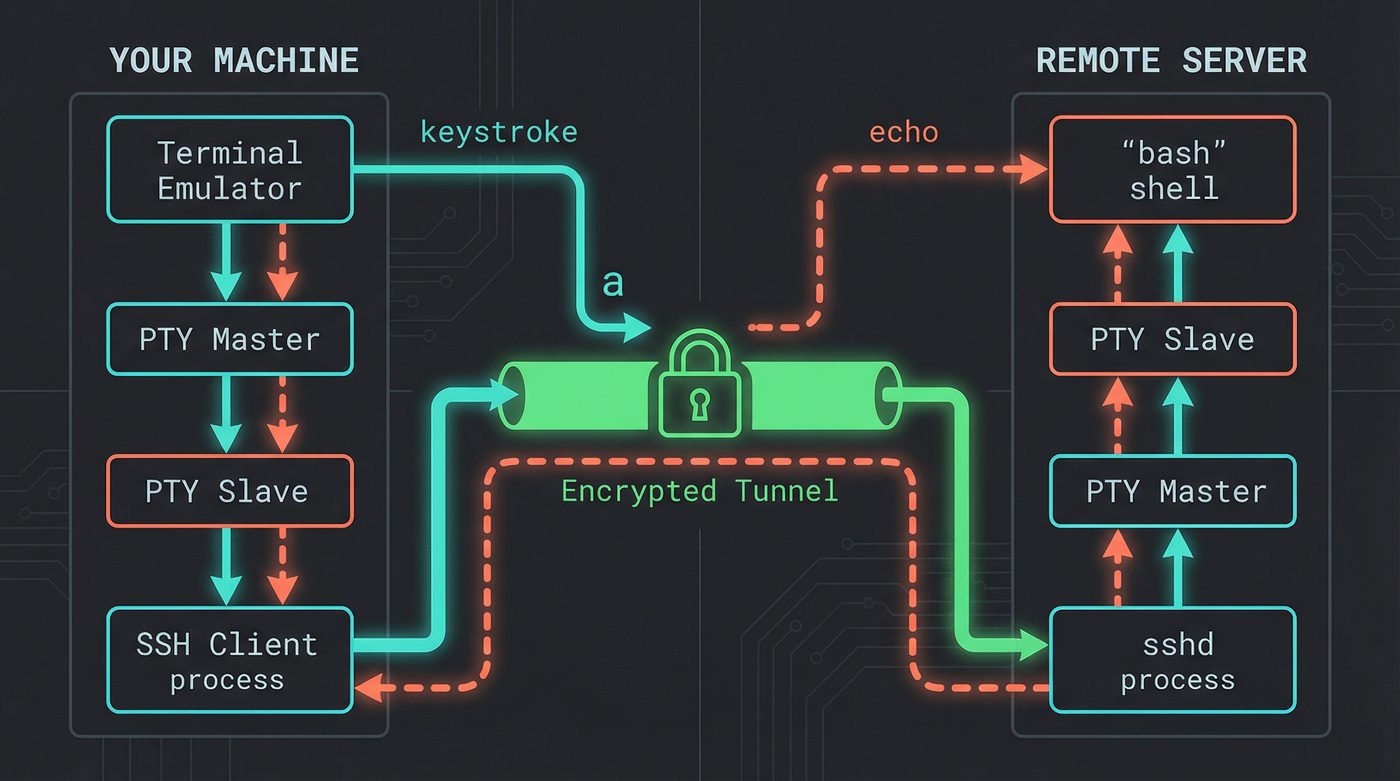
Your local terminal emulator talks to a local PTY pair. The slave end of that PTY connects to the SSH client process. On the remote side, sshd allocates another PTY pair. The master end connects to sshd, the slave end connects to your remote shell. Two PTY pairs, stitched together through an encrypted tunnel.
When you press a in an SSH session, the keystroke travels: terminal emulator to local PTY master, through the line discipline, out the slave to the SSH client, encrypted and sent over TCP, received by sshd, into the remote PTY master, through the remote line discipline, out the slave to bash, bash processes it, output goes back through the remote PTY master, encrypted, sent back, decrypted, through your local PTY, and finally rendered by your terminal emulator.
That's the round trip for a single character. Every keystroke you've ever typed over SSH has made this journey.
The remote PTY is also why terminal-aware programs work over SSH. When you run vim or htop on a remote machine, they query the remote PTY for terminal capabilities, size, and type. sshd propagates your TERM environment variable and handles window size changes (SIGWINCH) -- when you resize your local terminal, SSH sends a channel request to update the remote PTY's dimensions. That's why htop redraws when you resize the window, even over SSH.
If the SSH connection drops, sshd closes the remote PTY master. The kernel sends SIGHUP to every process in the remote session (post 05). That's why your long-running process dies when your laptop sleeps. And that's why tmux and screen exist -- they own the PTY master on the remote side, so when your SSH session dies, the PTY stays open (post 06).
SFTP vs SCP
SCP is deprecated. OpenSSH 9.0 switched scp to use the SFTP protocol internally by default. The scp command still exists, but under the hood it speaks SFTP.
Why? SCP's protocol was based on the ancient rcp (remote copy) protocol that shipped with early BSD Unix in the early 1980s. It had no way to list directory contents, no way to resume transfers, and a parsing vulnerability in filename handling that was essentially unfixable without breaking the protocol.
SFTP is not FTP over SSH. This is the most common misconception. SFTP is a completely separate file transfer protocol that runs as a subsystem within an SSH channel. It has nothing to do with FTP. No directory listings on port 21, no passive mode nonsense. It's a binary protocol with proper operations: open, close, read, write, stat, mkdir. It runs inside the SSH encrypted channel like any other channel.
Mosh: What SSH Can't Do
SSH has a fundamental limitation: it runs over TCP. TCP requires an unbroken connection. If your network changes (laptop moves from WiFi to cellular), your IP changes, and the TCP connection dies. If you're on a high-latency connection, every keystroke has to make the round trip before you see it.
Mosh (Mobile Shell) solves both problems. It uses SSH for initial authentication, then switches to its own protocol over UDP. It's the same move QUIC made in post 24 (HTTP) — TCP's connection model is the problem, so ditch it for UDP and build your own reliability on top. Mosh shipped for terminals in 2012. Google had GQUIC in production around 2014-2015, and the IETF formalised QUIC as RFC 9000 in 2021. Same insight, different layer, different decade. Mosh runs a server process on the remote end and communicates state diffs rather than byte streams.
The local echo is the killer feature. Mosh predicts what typing will look like and renders it immediately, marking predicted characters with an underline until the server confirms them. On a 200ms satellite link, SSH feels like typing through mud. Mosh feels normal.
Mosh also handles roaming. Because it uses UDP, there's no connection to break. If your IP changes, Mosh just starts sending packets from the new address. The server accepts them if the cryptographic session is valid. You can close your laptop, fly to a different country, open it, and your session is still there.
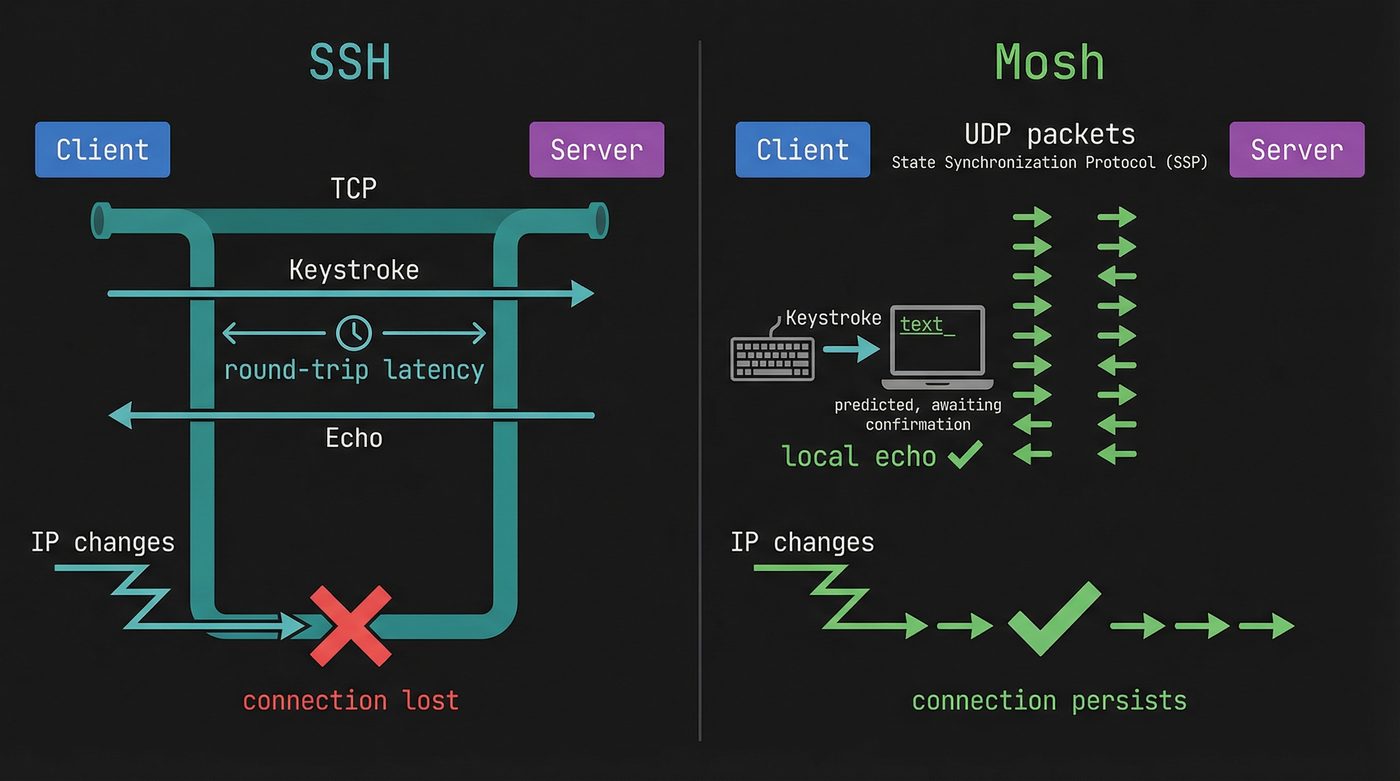
But Mosh doesn't replace SSH. It can't do port forwarding. It can't do agent forwarding. It can't do X11 forwarding. It requires UDP port 60000-61000 open on the server, which many corporate firewalls block. It still uses SSH for the initial handshake and authentication.
Mosh is a better interactive shell experience over bad networks. SSH is the protocol. They solve different problems.
Further Reading
- Post 01: What Happens When You Press a Key -- where the SSH keystroke path was first introduced.
- Post 05: Signals -- why SIGHUP kills your process when SSH disconnects.
- Post 06: Sessions -- setsid, tmux, and why they survive SSH drops.
- Post 20: The Handshake You Never See (TLS) -- the related key exchange concepts in a different protocol.
- RFC 4253: SSH Transport Layer Protocol -- the spec for everything in the transport section.
- RFC 4254: SSH Connection Protocol -- channels, port forwarding, session requests.
- OpenSSH Cookbook (Wikibooks) -- practical recipes for config and tunneling.
- SSH Mastery by Michael W. Lucas -- the best book on SSH I've read.
I'm writing a book about what makes developers irreplaceable in the age of AI. Join the early access list →
Naz Quadri has mass-deleted known_hosts entries he shouldn't have more times than he'd like to admit. He blogs at nazquadri.dev. Rabbit holes all the way down 🐇🕳️.